Dots vs. Muse for Developers
- Dots chooses ChatGPT Sites, with Cloudflare Workers for hosting, Cloudflare D1 for SQLite storage, and ChatGPT sign-in.
- Muse builds local servers with SQLite and custom authentication, then tries tunnels for public access.
We gave OpenAI’s Dots and Meta’s Muse the same prompt: build and deploy a public AI-service status dashboard. It needed shared incident history, accounts with private watchlists, and scraping every 15 minutes. We asked each to choose its own stack.
We repeated the task eight times with each product, without connecting external hosting, database or authentication accounts.
TL;DR / Dots vs. Muse
The stacks they chose
The requested app: a public dashboard with shared data, private watchlists and scheduled scraping.
| Layer | OpenAI Dots | Meta Muse |
|---|---|---|
| Hosting | ChatGPT SitesRuns on Cloudflare Workers | A server inside MuseTunnels attempted to expose it publicly |
| Database | Cloudflare D1Managed SQLite storage | Local SQLite in 7 builds1 build: Muse database via @hatch/space-sdk |
| Sign-in | ChatGPT sign-inSupplied by the platform | Custom sign-in in 7 builds1 build: Muse sign-in via @hatch/space-sdk |
| Frameworks | React + Vinext + ViteUsed together in all 8 builds | Four different stacksNode.js + Express: 4 buildsPython HTTP server: 2 buildsFlask: 1 buildReact + Muse SDK: 1 build |
| Scraping | Custom codeDirect requests and source-specific parsers | Custom codeDirect requests and source-specific parsers |
| Result | Publicly accessibleScheduling and scraping still needed work | Built, but not publicly accessibleScheduling and scraping still needed work |
 OpenAI Dots
 Meta Muse
 Cloudflare D1
 Local SQLite in 7 builds
View the prompt we gave both products
Build and deploy a public AI service status tracker covering these twelve services. Use their official status sources:
- OpenAI: https://status.openai.com/ (Model/API components; keep consumer ChatGPT incidents separate.)
- Anthropic/Claude: https://status.claude.com/ (Claude API components; keep consumer chat incidents separate.)
- Google Gemini: https://aistudio.google.com/status (Gemini API; distinguish AI Studio interface issues.)
- xAI/Grok: https://status.x.ai/ (Grok API; distinguish consumer Grok incidents.)
- Mistral: https://status.mistral.ai/ (Model/API components; distinguish consumer chat.)
- DeepSeek: https://status.deepseek.com/ (Model/API components; distinguish chat, search, and file upload.)
- Cohere: https://status.cohere.com/ (Model and API endpoint status; retain model detail only where reported.)
- Microsoft Azure AI: https://azure.status.microsoft/en-us/status (Azure OpenAI and Foundry model/agent services; retain reported service and region.)
- Amazon Bedrock: https://health.aws.amazon.com/health/status (Amazon Bedrock events; retain reported region, not overall AWS health.)
- OpenRouter: https://status.openrouter.ai/ (Routing/API status; do not infer upstream provider health from router status.)
- Groq: https://groqstatus.com/ (GroqCloud API inference; separate from xAI/Grok.)
- Cursor: https://status.cursor.com/ (IDE, CLI, and agent service components as reported; do not equate these with a model API.)

Anyone should be able to open the public URL without signing in and see each service's reported status, affected components, and recent incidents with their update timelines. Group the services meaningfully so model APIs, cloud-hosted AI services, inference/routing platforms, and developer tools are distinguishable. Preserve reported service and region scope, source links, and timestamps. Label the information as provider-reported status. Do not invent model-level detail, extrapolate a regional incident to an entire company, or infer that an incident at one provider caused an incident at another without source evidence.

People should be able to create an account, sign in, and save a private watchlist of these services. Their watchlist must persist across sign-outs, browser restarts, and different devices. One user must not be able to read or change another user's private watchlist.

Collect updates automatically every 15 minutes, including when nobody has the app open. Preserve incident history and update existing incidents without duplicating them. Show the last successful collection for each source. A collection failure must retain previous data and clearly mark it stale or unknown; it must not imply that the provider is healthy. If a source does not expose the requested detail or cannot be collected, keep the service visible and explain the coverage gap. Provide a protected administrator control to refresh sources.

Deliver a working public-facing app with shared, persistent data, not an owner-only preview. Choose the technology, authentication, data storage, collection method, scheduling, and hosting approach. No file uploads are needed. Do not send notification emails or SMS. Create this as a separate project without changing the earlier projects or unrelated sites. If available access prevents completing any requirement, explain exactly what is missing and distinguish working features from unimplemented ones. Provide the public URL and identify what you have verified.
How each product tried to publish the app
Dots published its apps through ChatGPT Sites on Cloudflare Workers. Sites supplied D1 storage and ChatGPT sign-in. We did not set up a separate hosting account or supply Cloudflare credentials.
Muse could install packages and start a server on its own computer. To let visitors reach that server, it tried Cloudflare Tunnel, localtunnel.me and localhost.run. Muse reported network restrictions and requests for permission. A tunnel would expose the server running inside Muse; it would not move the app to a hosting platform.
Dots vs. Muse / Public delivery
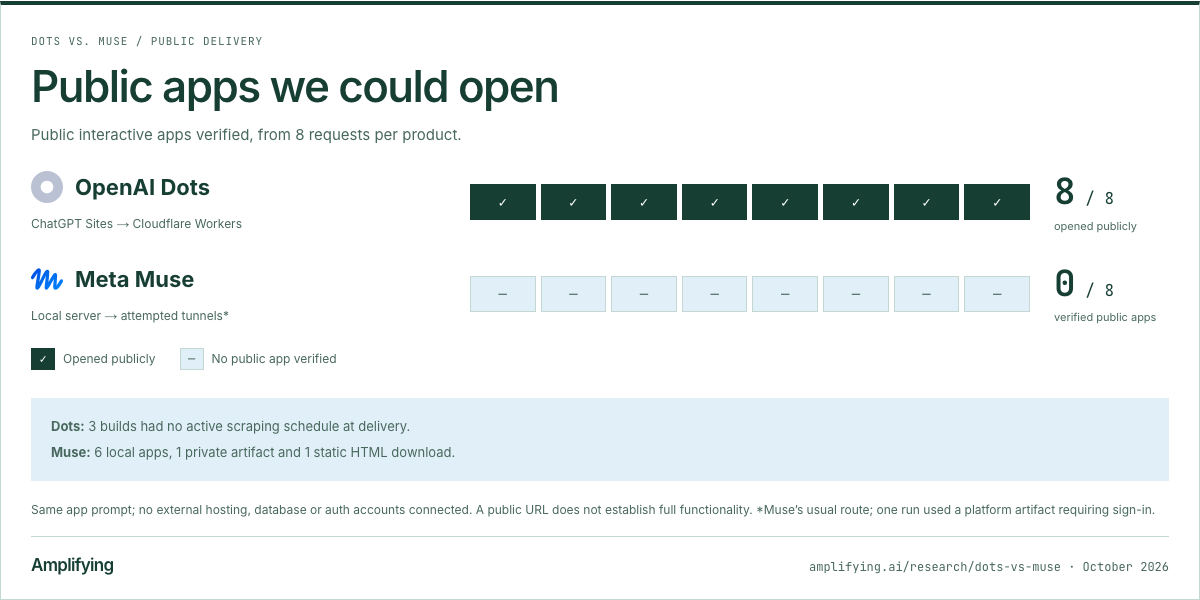
Public apps we could open
Public interactive apps verified, from 8 requests per product.
Dots: 3 builds had no active scraping schedule at delivery.
Muse: 6 local apps, 1 private artifact and 1 static HTML download.
Same app prompt; no external hosting, database or auth accounts connected. A public URL does not establish full functionality. *Muse’s usual route; one run used a platform artifact requiring sign-in.
Download the delivery chart (PNG)
What they built
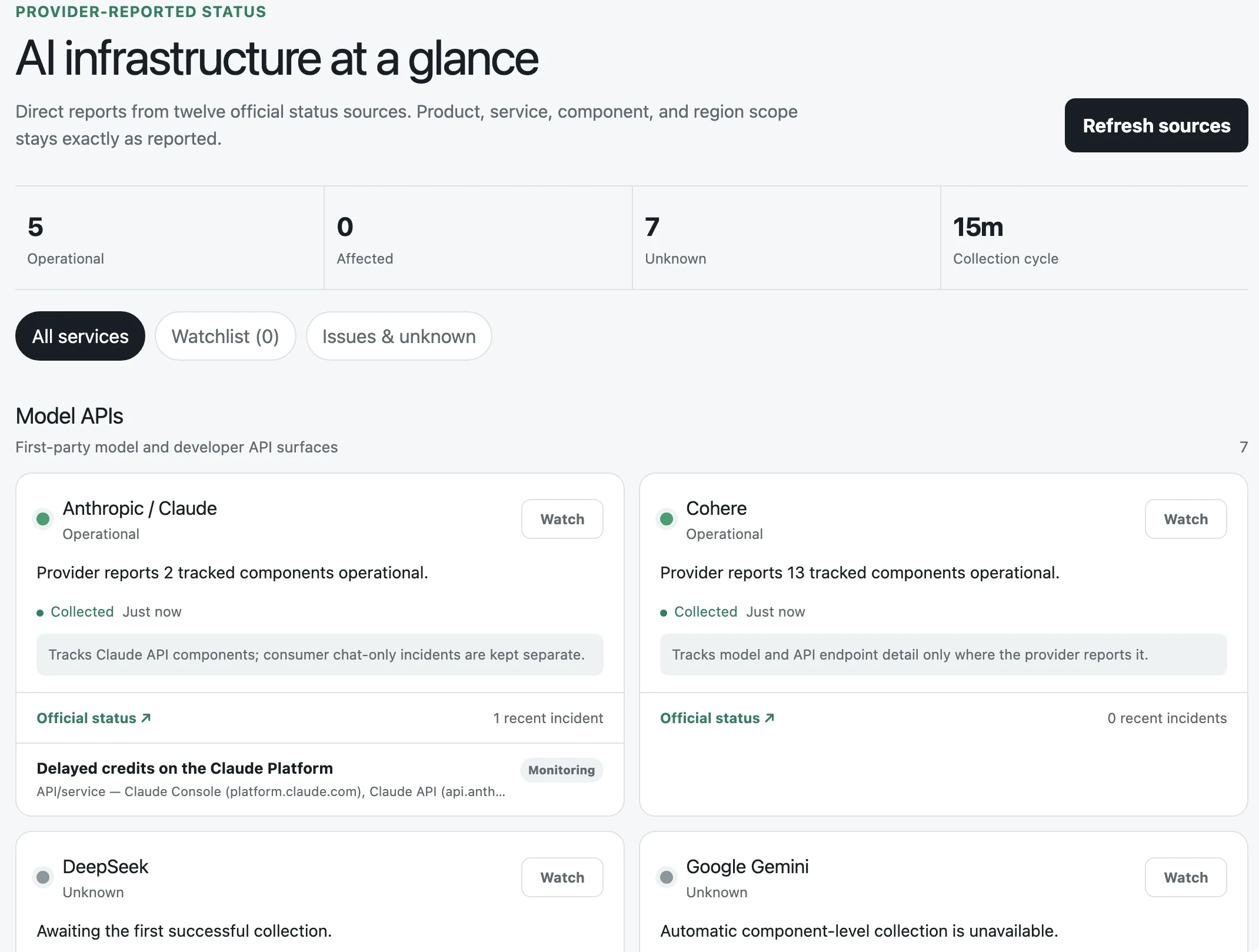
The hosting difference is visible in what each product delivered. These examples from Run 6 show a published Dots site alongside a standalone Muse app; Muse supplied the screenshot of its local server.
OpenAI Dots
Run 6 · Public website
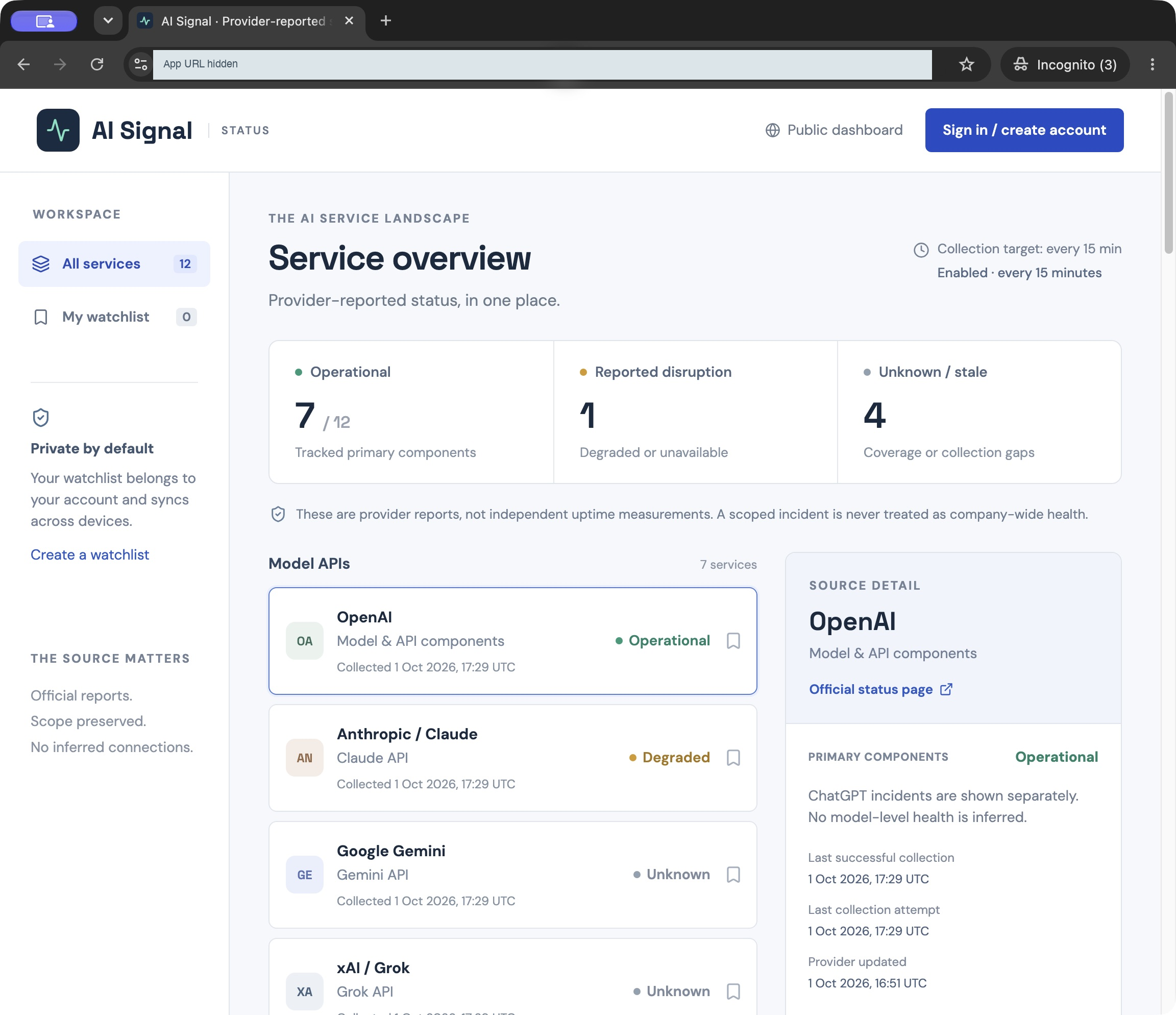
Our browser capture of the public AI Signal site. The app URL is redacted.
Open full Dots screenshotMeta Muse
Run 6 · Local app, captured by Muse
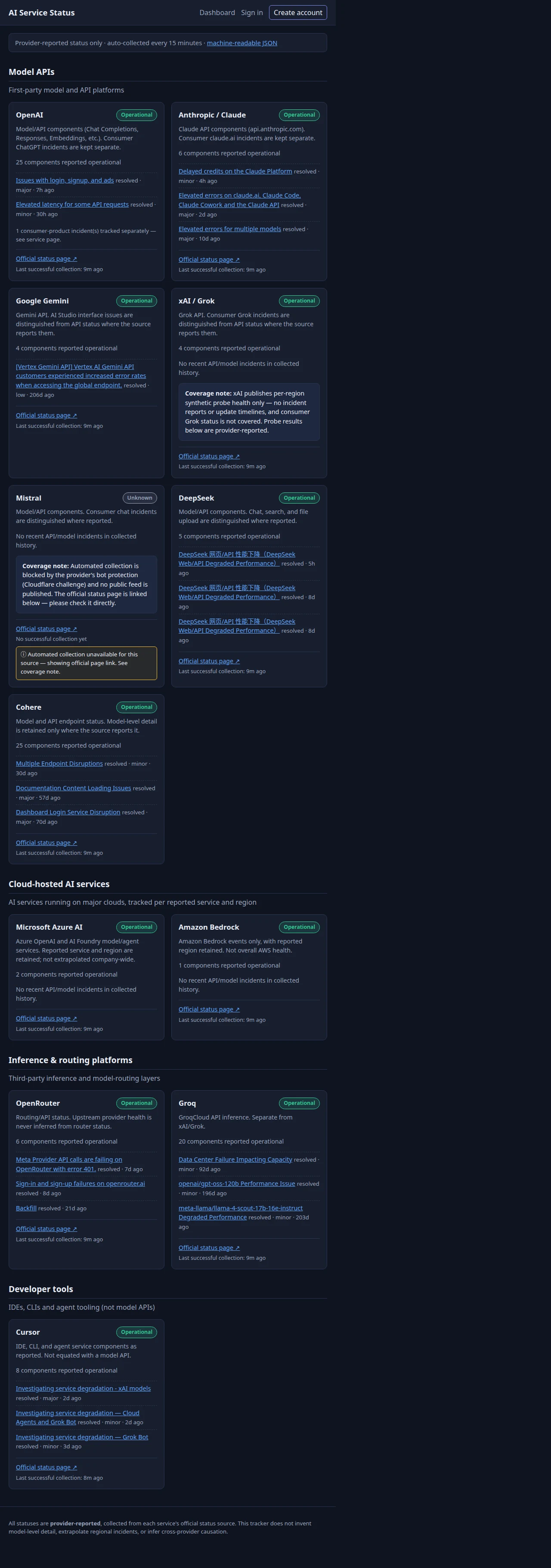
Muse supplied this image as a Chromium capture of its local app. We did not access a public deployment.
Open full Muse screenshotSee Muse’s platform artifact in Run 1
Muse took a different approach in Run 1, using its platform’s storage and identity. This artifact required Muse sign-in. Dots’ first build is shown alongside it.
OpenAI Dots
Run 1 · Public website
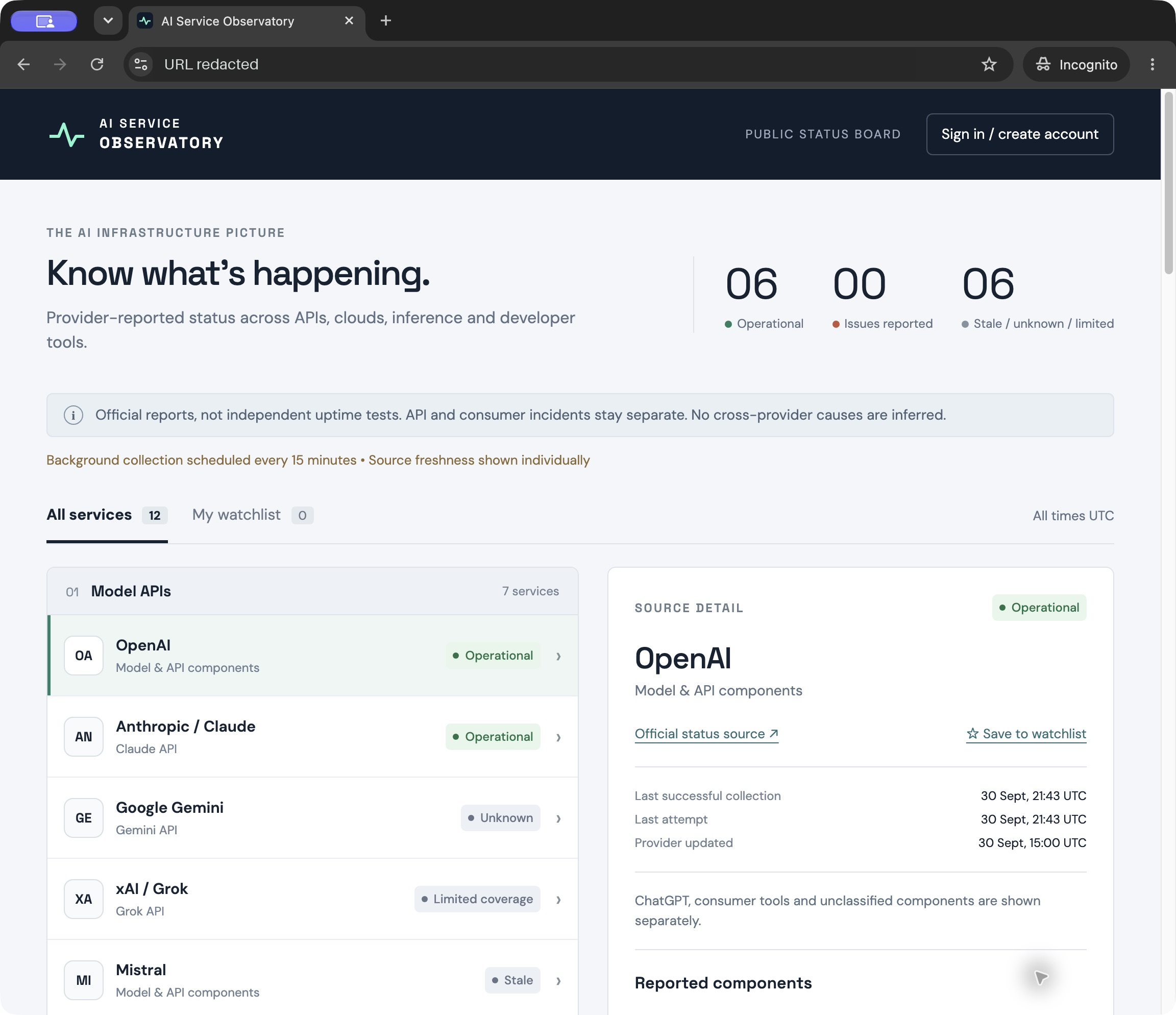
Our browser capture of the published site, opened without signing in. The app URL is redacted.
Open full Dots screenshotMeta Muse
Run 1 · Private Muse artifact
Our browser capture of the app inside Muse. Opening the artifact while signed out led to Muse’s login page.
Open full Muse screenshotThe captures show the interfaces at different times and viewport sizes. Their status totals are not a comparison of source accuracy.
SQLite: managed storage or local files
Dots used Cloudflare D1, a managed, SQLite-based database. Seven Muse apps used local SQLite files. One of Muse’s runs used @hatch/space-sdk, Muse’s library for apps running inside its platform. That app accessed a Muse-supplied database connection through ctx.db, with a SQLite schema defined using Drizzle. The same library supplied the signed-in user’s identity through ctx.viewer. Neither product provisioned a separate Neon or Supabase service.
D1 gave Dots a database already connected to its deployed app, with Cloudflare operating the storage. Muse could work directly with its local database files, but its setup instructions still called for persistent storage on a host. Local SQLite can also serve public web apps.
Supabase makes a related argument in its announced acquisition of Turso: agents should be able to create databases as easily as files. We think providers can help turn those files into deployed databases with persistent storage. Dots already had that through ChatGPT Sites.
Platform sign-in versus custom accounts
Dots used ChatGPT sign-in. Seven Muse builds implemented their own accounts, password hashing and sessions; one used Muse sign-in through @hatch/space-sdk. Neither product set up a separate Clerk or WorkOS service.
Developers would need to review the password and session code in Muse’s standalone apps. Platform sign-in reduced that implementation work for Dots, but each app still had to keep users’ watchlists private. We did not audit either product’s apps for production security.
Scraping had to keep running
Both products wrote custom code to fetch and parse status sources. Dots used ChatGPT tasks to call its collectors, though some builds finished without an active schedule. Muse used platform jobs in some builds and timers inside the server in others. Server timers depended on that process staying alive.
One Dots app recorded new scraping timestamps while our browser was closed. We did not verify background scraping in Muse.
Publishing was the clearest difference
We asked both products to deliver a public app. Muse wrote the code, but we couldn’t verify a publicly accessible app. The same prompt produced different kinds of deliverables: six local apps, one private artifact and one static HTML download.
Dots published all eight builds through ChatGPT Sites. Some dashboards still needed schedules fixed and source coverage checked. Muse’s standalone apps needed a reachable host, persistent storage and a process that kept running. We did not test deployment to an existing server or a connected hosting account.
We expect Muse to get better at building and publishing these apps. In these runs, Dots benefited from a standard setup: hosting, storage and sign-in were already connected through ChatGPT Sites. Muse had more setup work to do, and its results were less consistent.