What Muse Actually Chooses: Four Different Stacks, Not Fully Deployed
Muse built servers, databases and sign-in across four different stacks. Making the apps publicly accessible remained unfinished.
TL;DR
We gave Meta’s Muse the same prompt 8 times: build and deploy a public AI-service status dashboard, choosing its own stack.
Muse wrote the app code, but the apps weren’t fully deployed for public access. Seven builds used local SQLite files and custom accounts; one used a database connection and sign-in supplied by Muse.
The same request produced inconsistent results. Using four different stacks, Muse produced six local apps, one private artifact and one static HTML download.
We expect Muse to get better at completing this kind of task. For now, our Dots comparison shows the practical benefit of built-in hosting: Dots published through ChatGPT Sites in every run, while Muse tried to expose local servers through tunnels.
Meta gives each Muse its own computer to write code, store files and build tools. Nat Friedman, Meta’s AI product lead, has described Muse’s ambition as bringing an OpenClaw-inspired personal agent to billions of people. We wanted to see what it would choose when asked to build an app for other people to use.
Our test app was a public dashboard for tracking the reported status of 12 major AI services, including OpenAI, Claude, Gemini and OpenRouter. If an API starts failing, a team could use it to check for a provider outage and decide whether to switch to another provider.
Our app request
Our prompt asked for a public website that anyone could read, plus accounts for private watchlists. Incident history needed shared storage, and collection had to continue after visitors closed the page. We left the framework, hosting, database and authentication choices to Muse.
The tracker covered 12 services: OpenAI, Claude, Gemini, xAI/Grok, Mistral, DeepSeek, Cohere, Azure AI, Amazon Bedrock, OpenRouter, Groq and Cursor. It had to use official status sources and distinguish API incidents from consumer-product issues. This was a tracker of provider reports; it did not independently probe every API or switch traffic automatically. Missing information needed an explanation, rather than a healthy status invented by the app.
Like What Claude Code Actually Chooses, this study examines which tools an agent selects when the request names the job. This report covers the 8 Muse builds below.
View our prompt
Build and deploy a public AI service status tracker covering these twelve services. Use their official status sources:
- OpenAI: https://status.openai.com/ (Model/API components; keep consumer ChatGPT incidents separate.)
- Anthropic/Claude: https://status.claude.com/ (Claude API components; keep consumer chat incidents separate.)
- Google Gemini: https://aistudio.google.com/status (Gemini API; distinguish AI Studio interface issues.)
- xAI/Grok: https://status.x.ai/ (Grok API; distinguish consumer Grok incidents.)
- Mistral: https://status.mistral.ai/ (Model/API components; distinguish consumer chat.)
- DeepSeek: https://status.deepseek.com/ (Model/API components; distinguish chat, search, and file upload.)
- Cohere: https://status.cohere.com/ (Model and API endpoint status; retain model detail only where reported.)
- Microsoft Azure AI: https://azure.status.microsoft/en-us/status (Azure OpenAI and Foundry model/agent services; retain reported service and region.)
- Amazon Bedrock: https://health.aws.amazon.com/health/status (Amazon Bedrock events; retain reported region, not overall AWS health.)
- OpenRouter: https://status.openrouter.ai/ (Routing/API status; do not infer upstream provider health from router status.)
- Groq: https://groqstatus.com/ (GroqCloud API inference; separate from xAI/Grok.)
- Cursor: https://status.cursor.com/ (IDE, CLI, and agent service components as reported; do not equate these with a model API.)

Anyone should be able to open the public URL without signing in and see each service's reported status, affected components, and recent incidents with their update timelines. Group the services meaningfully so model APIs, cloud-hosted AI services, inference/routing platforms, and developer tools are distinguishable. Preserve reported service and region scope, source links, and timestamps. Label the information as provider-reported status. Do not invent model-level detail, extrapolate a regional incident to an entire company, or infer that an incident at one provider caused an incident at another without source evidence.

People should be able to create an account, sign in, and save a private watchlist of these services. Their watchlist must persist across sign-outs, browser restarts, and different devices. One user must not be able to read or change another user's private watchlist.

Collect updates automatically every 15 minutes, including when nobody has the app open. Preserve incident history and update existing incidents without duplicating them. Show the last successful collection for each source. A collection failure must retain previous data and clearly mark it stale or unknown; it must not imply that the provider is healthy. If a source does not expose the requested detail or cannot be collected, keep the service visible and explain the coverage gap. Provide a protected administrator control to refresh sources.

Deliver a working public-facing app with shared, persistent data, not an owner-only preview. Choose the technology, authentication, data storage, collection method, scheduling, and hosting approach. No file uploads are needed. Do not send notification emails or SMS. Create this as a separate project without changing the earlier projects or unrelated sites. If available access prevents completing any requirement, explain exactly what is missing and distinguish working features from unimplemented ones. Provide the public URL and identify what you have verified.
What Muse delivered
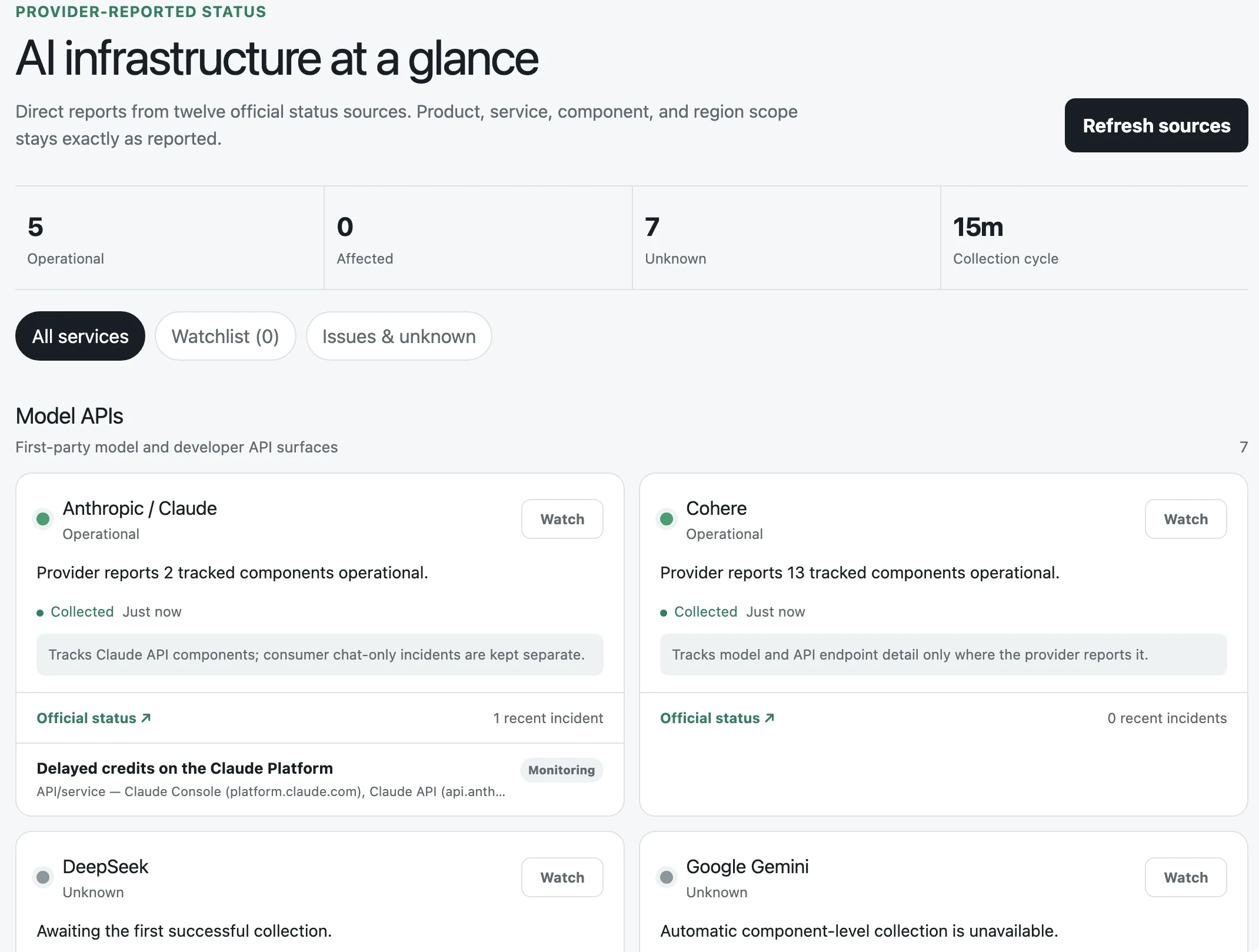
Muse produced six local apps, one private Muse artifact and one static HTML download. We couldn’t verify a publicly accessible app.
Select a run below to see its build steps and screenshot. The image labels distinguish our browser captures from screenshots supplied by Muse.
Run 1: React inside Muse
Private artifact
- Researched the official sources and built a React app with the platform SDK.
- Used platform identity, a Drizzle SQLite schema and a managed-job declaration.
- Delivered an owner-only artifact. Our signed-out check reached Muse’s login page.
Private artifact; public access failed.
Muse built on the computer it already had
Seven builds used standalone servers in Node.js, Python or Flask. One used React with Muse’s app SDK. The frameworks varied, but the standalone apps kept their server code, database files and account logic together.
Meta supplies a Linux virtual machine with a browser, storage and support for code and scheduled jobs. Its architecture description explains how code runs in an isolated container while a separate service, Sentinel, controls outgoing connections and approvals.
That computer was enough to start a local server. Muse still had to make it reachable by visitors on the public web.
Where Muse put the app
Most of the stack stayed inside Muse.
7 standalone apps
Muse’s computer
 Muse’s computer
- Server
- Express, Python HTTP server or Flask
- Storage
- SQLite files
- Identity
- Accounts written into the app

Attempted tunnels
Cloudflare Tunnellocaltunnel.me
localhost.run
Requested destination
A public app
Anyone can browse.
Users can sign in.
Collection keeps running.
Frameworks in the source exports
Four framework stacks across eight requests
Muse tried tunnels to publish its apps
Muse tried Cloudflare Tunnel, localtunnel.me and localhost.run to give its local servers public addresses. Run 6 also left an ngrok option awaiting a token. These tunnels would have exposed servers still running inside Muse.
Muse reported proxy and network restrictions or permission waits. Run 8 asked for a network-policy change or a connected hosting account; we supplied neither. Meta documents network controls, but we did not establish the cause of every failed connection.
Run 1’s platform artifact redirected to Muse sign-in when we opened it while signed out. Run 7’s HTML snapshot was downloadable without signing in, with a 48-hour expiry. It could not scrape fresh data or support accounts and private watchlists. Neither met the public-app requirement.
Tailscale’s Muse integration lets Muse reach machines on your private network, which could let it deploy to a server you already use for public hosting. We didn’t connect Tailscale in these runs; the connection alone would not make an app on Muse’s computer public.
Tunneling, run by run
Tunnel attempts across the eight runs
| Service / Run | 1 | 2 | 3 | 4 | 5 | 6 | 7 | 8 |
|---|---|---|---|---|---|---|---|---|
| Cloudflare Tunnel | Not recorded | Attempt recorded | Not recorded | Attempt recorded | Not recorded | Attempt recorded | Attempt recorded | Attempt recorded |
| localtunnel.me | Not recorded | Permission requested | Not recorded | Attempt recorded | Not recorded | Attempt recorded | Attempt recorded | Not recorded |
| localhost.run | Not recorded | Permission requested | Not recorded | Permission requested | Not recorded | Attempt recorded | Attempt recorded | Not recorded |
 | Not recorded | Not recorded | Not recorded | Not recorded | Not recorded | Awaiting token | Not recorded | Not recorded |
 Cloudflare Tunnel
 localtunnel.me
 localhost.run
Inspect the hosting source by run
Compare the exported source
Run 1
Muse platform artifact configuration. The delivered backend artifact required Muse sign-in.
{
  "runtime": "typescript",
  "platformVersion": 24,
  "entry": "client/dist/index.html",
  "name": "AI Service Status Tracker",
  "slug": "ai-service-status-tracker",
  "managedCronJobs": ["ai-service-status-tracker-refresh-15m"]
}
SQLite kept the data with the app
Seven builds stored status history, users and watchlists in local SQLite files. One used @hatch/space-sdk, Muse’s library for apps running inside its platform. The app read and wrote data through the database connection supplied by Muse (ctx.db), with a SQLite schema defined using Drizzle. None provisioned MongoDB, Neon, Turso or Supabase.
The database libraries varied by runtime: node:sqlite in Runs 3 and 4, better-sqlite3 in Runs 5 and 6, and sqlite3 in the Python apps.
Creating a local file let Muse start storing data without connecting a database service. For deployment, its setup instructions called for persistent disk storage so the file would survive server updates and restarts.
Supabase is targeting this kind of workload with its announced acquisition of Turso. In the October 2 announcement, Supabase argues that agents should be able to create databases as easily as files, and identifies SQLite as a fit for small, on-demand workloads. Muse’s generated apps already followed that pattern. A provider could help deploy these existing SQLite apps with persistent storage.
Inspect the storage source by run
Compare the exported source
Run 1
Drizzle declares a SQLite schema; server actions use the platform database context.
import { integer, primaryKey, sqliteTable, text, uniqueIndex } from "drizzle-orm/sqlite-core";

export const services = sqliteTable("services", {
  id: text("id").primaryKey(),
  name: text("name").notNull(),
  category: text("category", { enum: ["model_api", "cloud_ai", "inference_routing", "developer_tool"] }).notNull(),
  sourceUrl: text("source_url").notNull(),
  status: text("status", { enum: ["operational", "degraded", "outage", "maintenance", "unknown"] }).notNull().default("unknown"),
  statusDetail: text("status_detail").notNull().default("Awaiting the first successful collection."),
  affectedComponents: text("affected_components").notNull().default("[]"),
  coverageNote: text("coverage_note"),
  lastAttemptAt: integer("last_attempt_at", { mode: "timestamp_ms" }),
  lastSuccessAt: integer("last_success_at", { mode: "timestamp_ms" }),
  collectionError: text("collection_error"),
  updatedAt: integer("updated_at", { mode: "timestamp_ms" }).notNull().$defaultFn(() => new Date()),
});
Seven builds implemented their own accounts
Muse used scrypt, bcrypt, PBKDF2 or Werkzeug for password hashing in the 7 builds with custom accounts, with database sessions or JSON Web Tokens (JWTs). It did not set up Clerk, WorkOS or Auth0.
The generated code also handled session expiry and administrator access. Run 4 made the first registered user the administrator. We inspected the source but did not audit whether the apps reliably isolated each user’s data for production use.
One run used @hatch/space-sdk to identify the signed-in user through ctx.viewer and associate private watchlists with that user. It relied on Muse’s sign-in rather than creating its own password-based accounts. Hatch is Meta’s internal name for Muse.
Inspect the identity source by run
Compare the exported source
Run 1
Identity comes from the platform viewer, rather than an app password table.
function viewerId(ctx: Ctx): string | null {
  const viewer = ctx.viewer;
  if (!viewer?.authenticated) return null;
  return viewer.source === "local" ? viewer.userId : viewer.viewerFbid;
}
Custom scraping left gaps in coverage
All 8 source exports contained custom collectors using HTTP requests and parsers for JSON, RSS feeds and HTML. We found no commercial scraping-service integration.
Run 8 fetched Google Cloud incidents and filtered for Vertex Gemini API, while our prompt specified the Gemini API source at AI Studio. That did not tell us whether the requested Gemini API was affected.
Other gaps were visible in Muse’s own reports. Run 1 reported data from 5 sources and left 7 unknown. Run 7 supported 5 Statuspage sources plus xAI’s RSS feed. Runs 6 and 8 reported 11 working sources, with Mistral blocked. We did not independently check those source counts.
Inspect the collection source by run
Compare the exported source
Run 1
Native fetch retrieves the provider JSON and validates it.
  try {
    const response = await fetch(config.endpoint, { headers: { accept: "application/json" } });
    if (!response.ok) throw new Error(`Official source returned HTTP ${response.status}.`);
    const parsed = statusPageSchema.safeParse(await response.json());
    if (!parsed.success) throw new Error("Official source returned an unsupported response shape.");
    const data = parsed.data;
    const relevant = data.components.filter((component) => matchesComponent(component.name, config));
    const affected = relevant.filter((component) => component.status !== "operational").map((component) => component.name);
Some schedules depended on the server staying alive
Scraping every 15 minutes required a job that would keep running after the user left. Muse used its platform’s scheduled jobs in some builds and timers inside the app server in others.
Scheduled-task cards were visible in Runs 6, 7 and 8. One run declared a managed job in its platform configuration, and Muse reported installing it. Runs 3 and 4 used setInterval and node-cron inside the server process. Those timers stopped if the server stopped.
Muse also tried to keep servers alive: Run 6 paired scraping every 15 minutes with a server-restart check every 5 minutes, and Run 8 included a script to check that the server was running. Runs 2 and 5 had no installed schedule when archived.
Runs 1, 6, 7, 8
Job declared in configuration or shown as a Muse task.
Runs 3, 4
Collection depended on the app process staying alive.
Runs 2, 5
No active schedule when we archived the run.
Inspect the scheduling source by run
Compare the exported source
Run 1
Managed job declared; Muse reported installing it. We did not independently observe timer execution.
  "name": "AI Service Status Tracker",
  "slug": "ai-service-status-tracker",
  "managedCronJobs": ["ai-service-status-tracker-refresh-15m"]
Connected services could change the choices
Muse also supports connected services. Meta’s small-business launch names Lovable, Figma, Canva, Shopify, Stripe, QuickBooks, Slack and Notion connectors. Muse’s settings contain the full list; its connector guide also covers custom connections.
On September 28, Meta announced Meta Enterprise Platform and hired MongoDB CEO Chirantan “CJ” Desai to lead it. Muse, Muse Code and the Muse API are among the products it plans to bring to businesses and developers.
We ran Muse without external hosting, database or authentication accounts. Connecting those services could change what it builds and where it deploys.
Dots vs. Muse
We also ran the same benchmark on OpenAI’s Dots. Dots published its apps through ChatGPT Sites, using Cloudflare for hosting and storage. See Dots vs. Muse for Developers for the stacks, screenshots and results side by side.