What Dots Actually Choose: OpenAI’s Agent Already Has a Stack
OpenAI’s own app platform, powered by Cloudflare.
TL;DR
We asked OpenAI’s Dots to build an AI-service status dashboard and left the technology choices open. Across 8 builds, it used Cloudflare Workers, Cloudflare D1 and ChatGPT sign-in every time. ChatGPT Sites supplied the hosting, database and identity services without separate vendor accounts to set up.
Vercel, Neon, Supabase, Clerk and WorkOS never became service integrations. We saw no comparison of competing providers.
For developer-tool companies, the default stack is the competition. Users get an app with less setup, while OpenAI keeps the customer relationship through the platform running it. A place in the plugin directory may not be enough: vendors need to give the agent a reason to use their product when hosting, storage and sign-in are already handled.
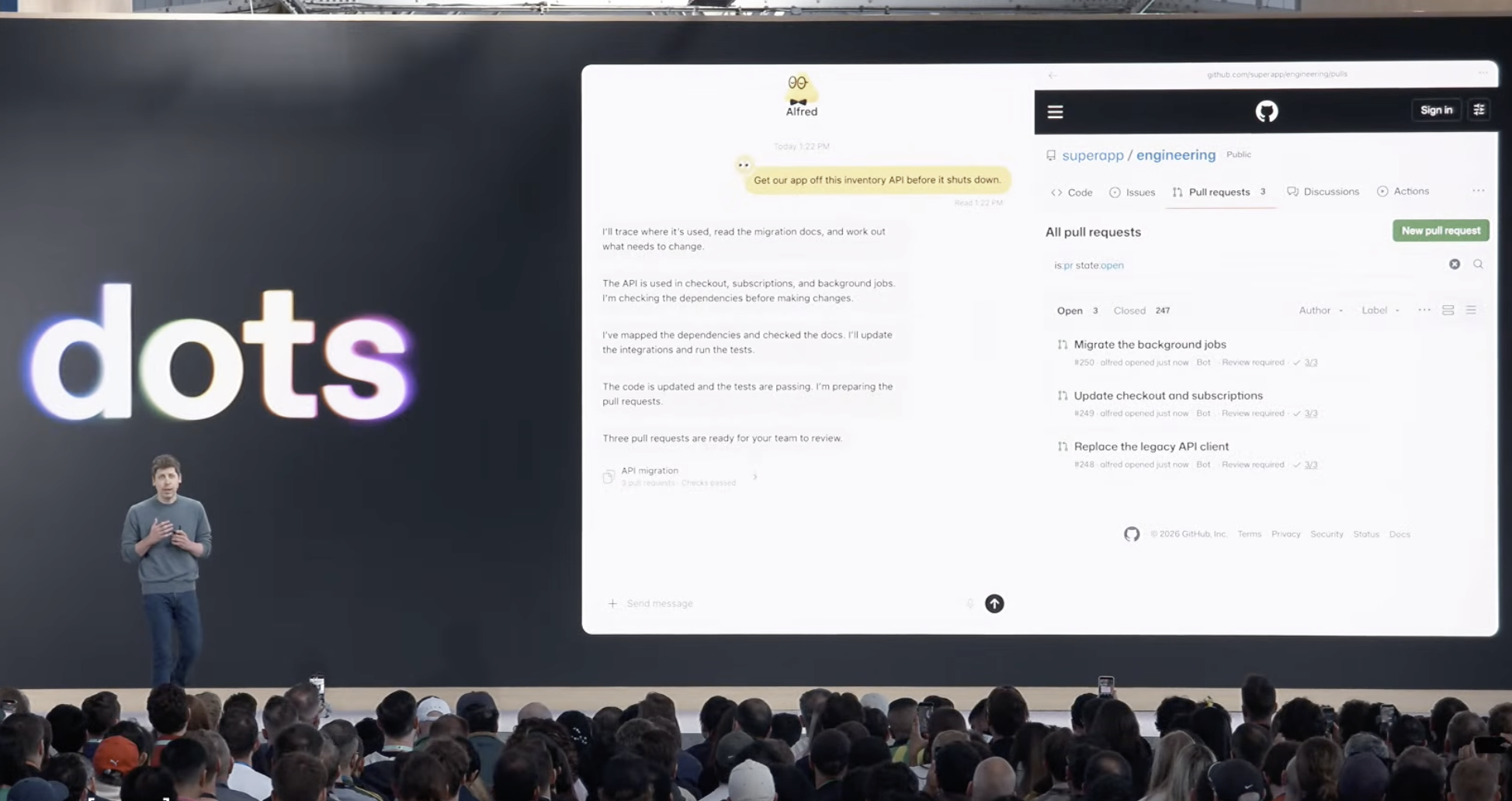
OpenAI introduced Dots on September 29, 2026, with software development among its use cases. In the launch presentation, Sam Altman showed a Dot taking an API migration request through to GitHub pull requests. OpenAI’s announcement also describes Dots investigating bugs, building apps and preparing tested changes for developers to review.
Our test app was a public dashboard for tracking the reported status of 12 major AI services, including OpenAI, Claude, Gemini and OpenRouter. If an API starts failing, a team could use it to check for a provider outage and decide whether to switch to another provider.
The app had to collect official status pages and feeds every 15 minutes, store incident history, and let signed-in users save private watchlists. It needed to scrape data in the background and flag missing or stale information.
Eight Dots builds · inspected source
 Cloudflare Workers
 ChatGPT sign-in
Our app request
Our prompt asked for a public website that anyone could read, plus accounts for private watchlists. Incident history needed shared storage, and collection had to continue after visitors closed the page. We left the framework, hosting, database and authentication choices to Dots.
The tracker covered 12 services: OpenAI, Claude, Gemini, xAI/Grok, Mistral, DeepSeek, Cohere, Azure AI, Amazon Bedrock, OpenRouter, Groq and Cursor. It had to use official status sources and distinguish API incidents from consumer-product issues. This was a tracker of provider reports; it did not independently probe every API or switch traffic automatically. Missing information needed an explanation, rather than a healthy status invented by the app.
Like What Claude Code Actually Chooses, this study examines which tools an agent selects when the request names the job. This report covers the 8 Dots builds below.
View our prompt
Build and deploy a public AI service status tracker covering these twelve services. Use their official status sources:
- OpenAI: https://status.openai.com/ (Model/API components; keep consumer ChatGPT incidents separate.)
- Anthropic/Claude: https://status.claude.com/ (Claude API components; keep consumer chat incidents separate.)
- Google Gemini: https://aistudio.google.com/status (Gemini API; distinguish AI Studio interface issues.)
- xAI/Grok: https://status.x.ai/ (Grok API; distinguish consumer Grok incidents.)
- Mistral: https://status.mistral.ai/ (Model/API components; distinguish consumer chat.)
- DeepSeek: https://status.deepseek.com/ (Model/API components; distinguish chat, search, and file upload.)
- Cohere: https://status.cohere.com/ (Model and API endpoint status; retain model detail only where reported.)
- Microsoft Azure AI: https://azure.status.microsoft/en-us/status (Azure OpenAI and Foundry model/agent services; retain reported service and region.)
- Amazon Bedrock: https://health.aws.amazon.com/health/status (Amazon Bedrock events; retain reported region, not overall AWS health.)
- OpenRouter: https://status.openrouter.ai/ (Routing/API status; do not infer upstream provider health from router status.)
- Groq: https://groqstatus.com/ (GroqCloud API inference; separate from xAI/Grok.)
- Cursor: https://status.cursor.com/ (IDE, CLI, and agent service components as reported; do not equate these with a model API.)

Anyone should be able to open the public URL without signing in and see each service's reported status, affected components, and recent incidents with their update timelines. Group the services meaningfully so model APIs, cloud-hosted AI services, inference/routing platforms, and developer tools are distinguishable. Preserve reported service and region scope, source links, and timestamps. Label the information as provider-reported status. Do not invent model-level detail, extrapolate a regional incident to an entire company, or infer that an incident at one provider caused an incident at another without source evidence.

People should be able to create an account, sign in, and save a private watchlist of these services. Their watchlist must persist across sign-outs, browser restarts, and different devices. One user must not be able to read or change another user's private watchlist.

Collect updates automatically every 15 minutes, including when nobody has the app open. Preserve incident history and update existing incidents without duplicating them. Show the last successful collection for each source. A collection failure must retain previous data and clearly mark it stale or unknown; it must not imply that the provider is healthy. If a source does not expose the requested detail or cannot be collected, keep the service visible and explain the coverage gap. Provide a protected administrator control to refresh sources.

Deliver a working public-facing app with shared, persistent data, not an owner-only preview. Choose the technology, authentication, data storage, collection method, scheduling, and hosting approach. No file uploads are needed. Do not send notification emails or SMS. Create this as a separate project without changing the earlier projects or unrelated sites. If available access prevents completing any requirement, explain exactly what is missing and distinguish working features from unimplemented ones. Provide the public URL and identify what you have verified.
How each build unfolded
Each tab shows a separate build of the same app request. Dots’ visible updates described source research, app construction, tests, fixes and deployment. The sequences below summarize those updates alongside the delivered code and apps. A reported test step means Dots said it was testing; it does not establish that we independently verified the result.
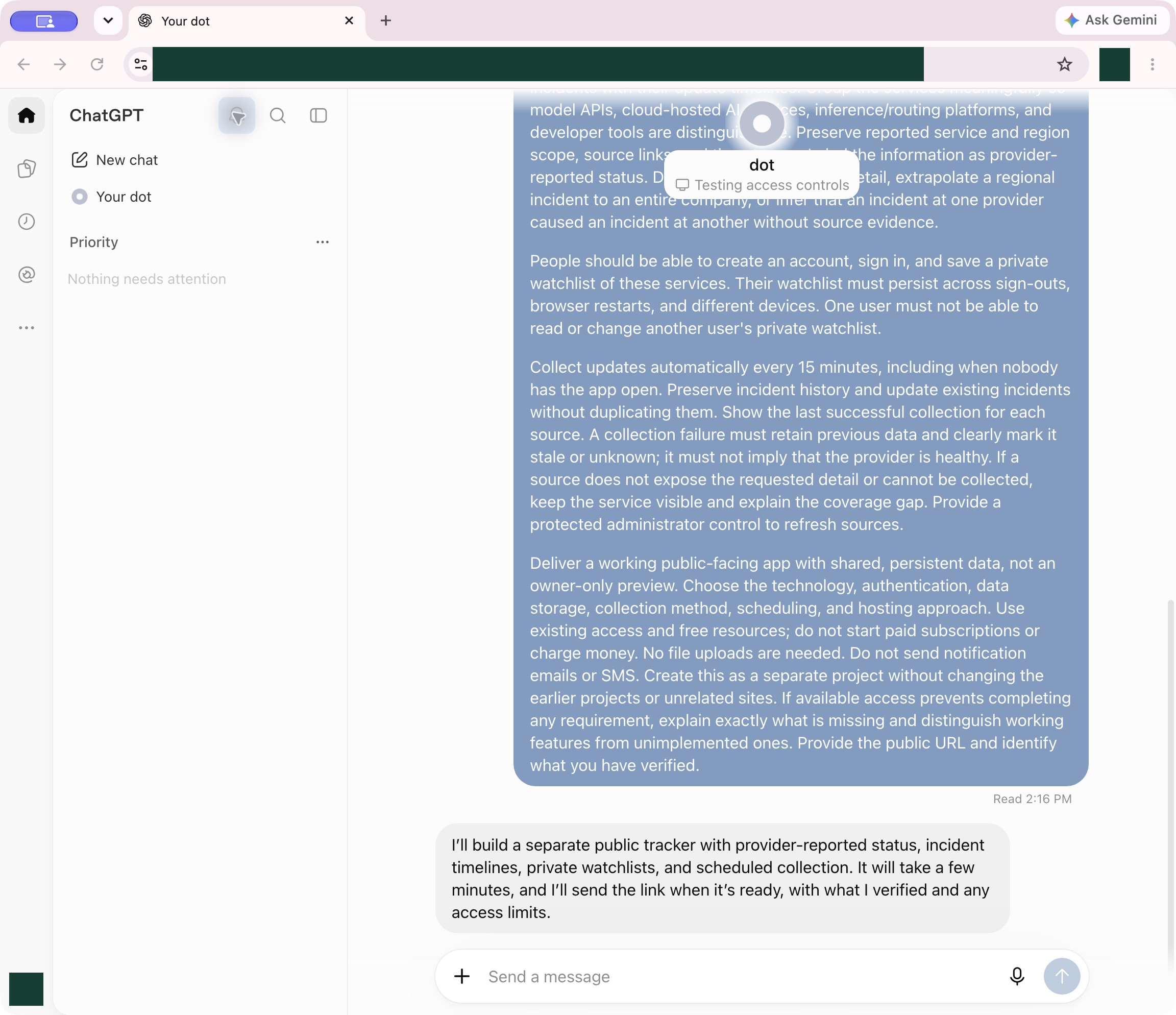
The apps looked different, but all 8 used the same hosting, database and sign-in services. We hid the app URLs in the screenshots; everything else is unchanged.
Run 1
Dots named this app AI Service Observatory.
First delivery: 28m40s
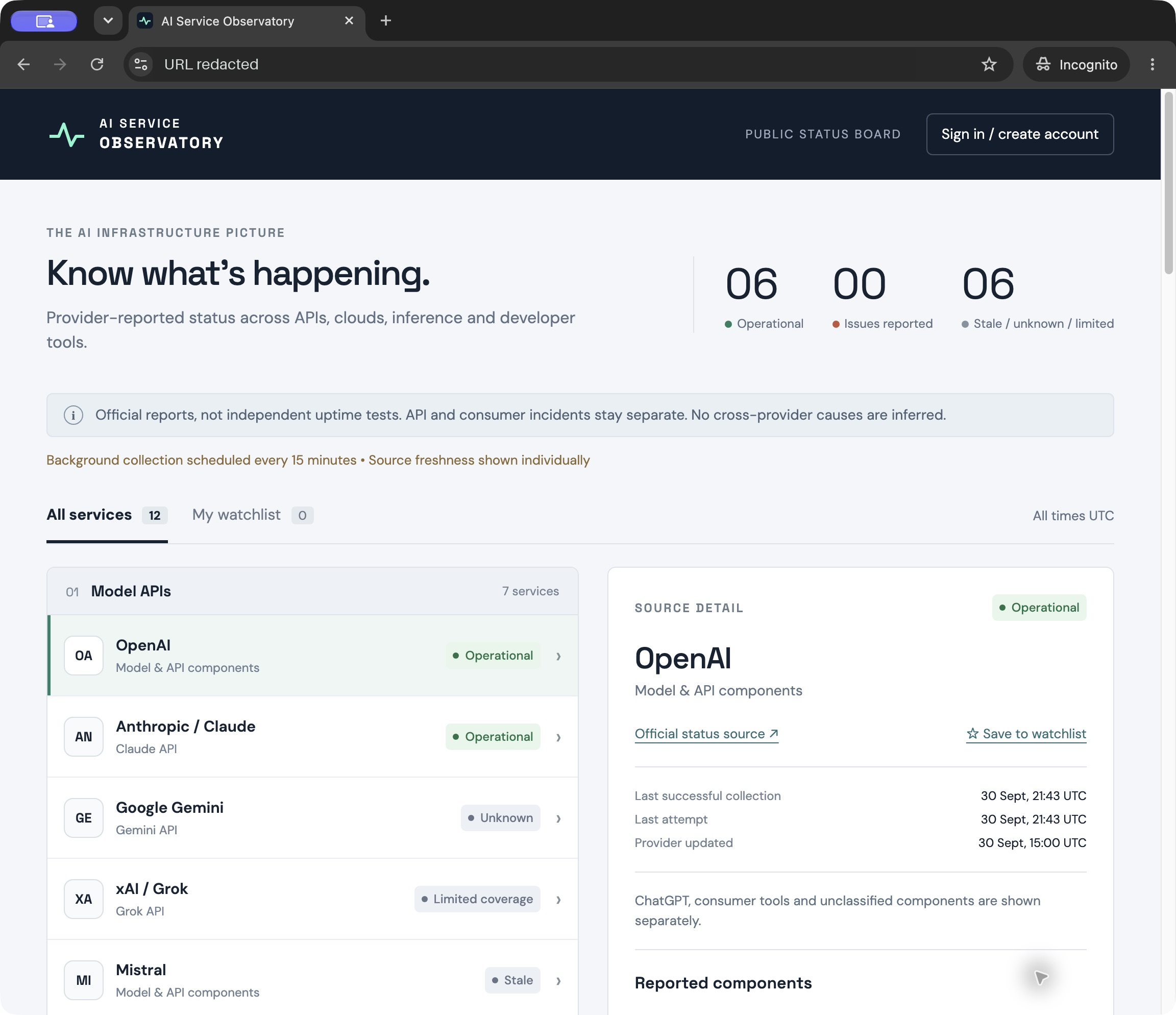
- Dots began with a scheduling limitation, then drafted the database schema and built the dashboard.
- It requested an app connection for the collector. The user connected it while the build continued.
- Dots gathered source data, reported access-control checks and added a lock to prevent overlapping collection. Some sources remained blocked or incomplete.
- It adjusted the schedule settings, checked the public interface and returned the live site.
The site opened publicly and a task was configured. Background operation remained unverified.
Run 2
Dots named this app Signal.
First delivery: 27m04s
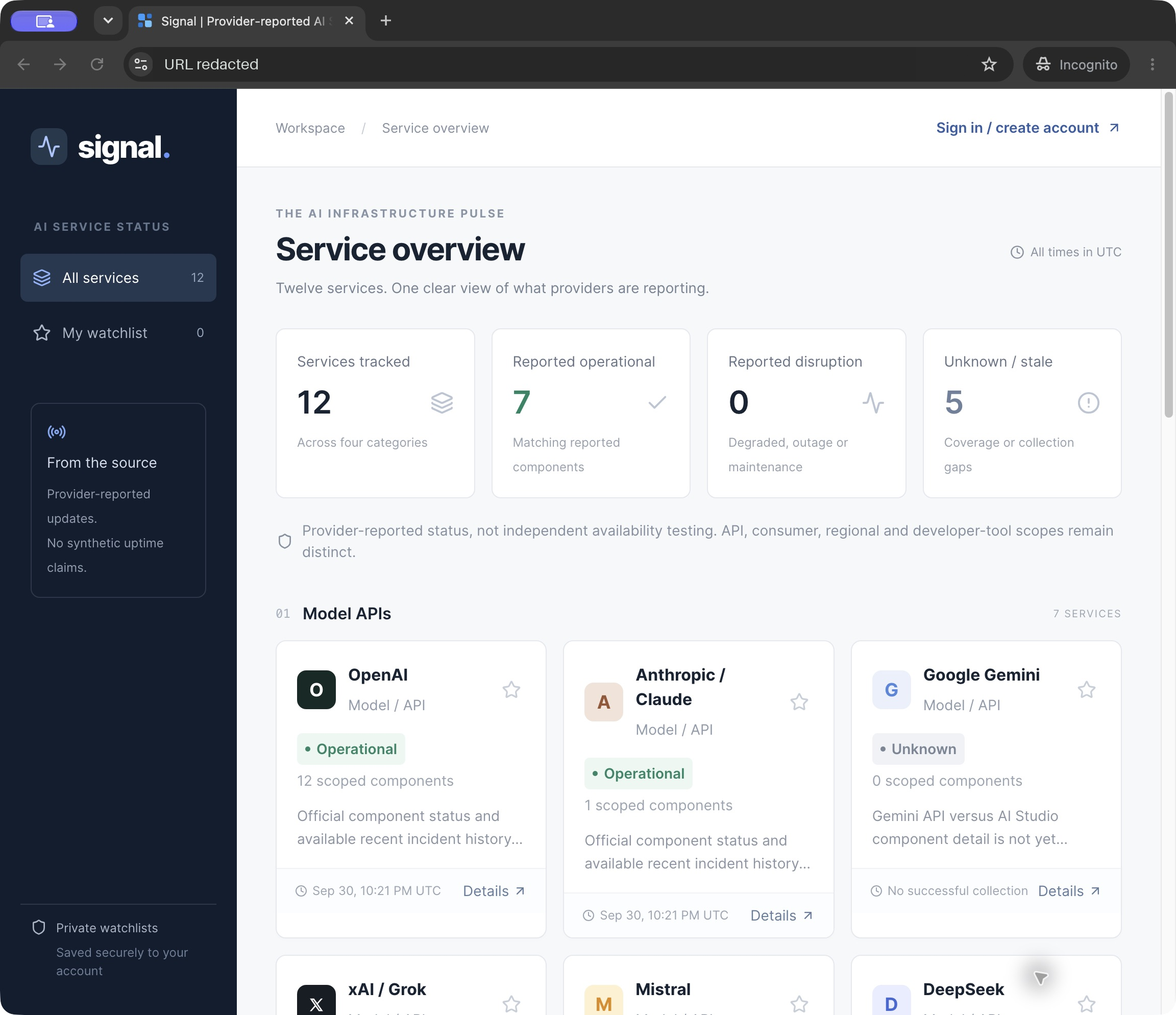
- Dots checked site access and scheduling options, then worked on HTML sources and incident history.
- It reported local status and authentication tests before arranging recurring checks.
- After checking the public app, Dots revised background scraping, component mappings and the status-read logic. It also reported a check that failed requests retained old data.
- The delivered app let a scheduled public request start collection when due. The collector could continue in the Worker’s background request context.
Dots configured the schedule without a new app connection. Sustained background operation remained unverified.
Run 3
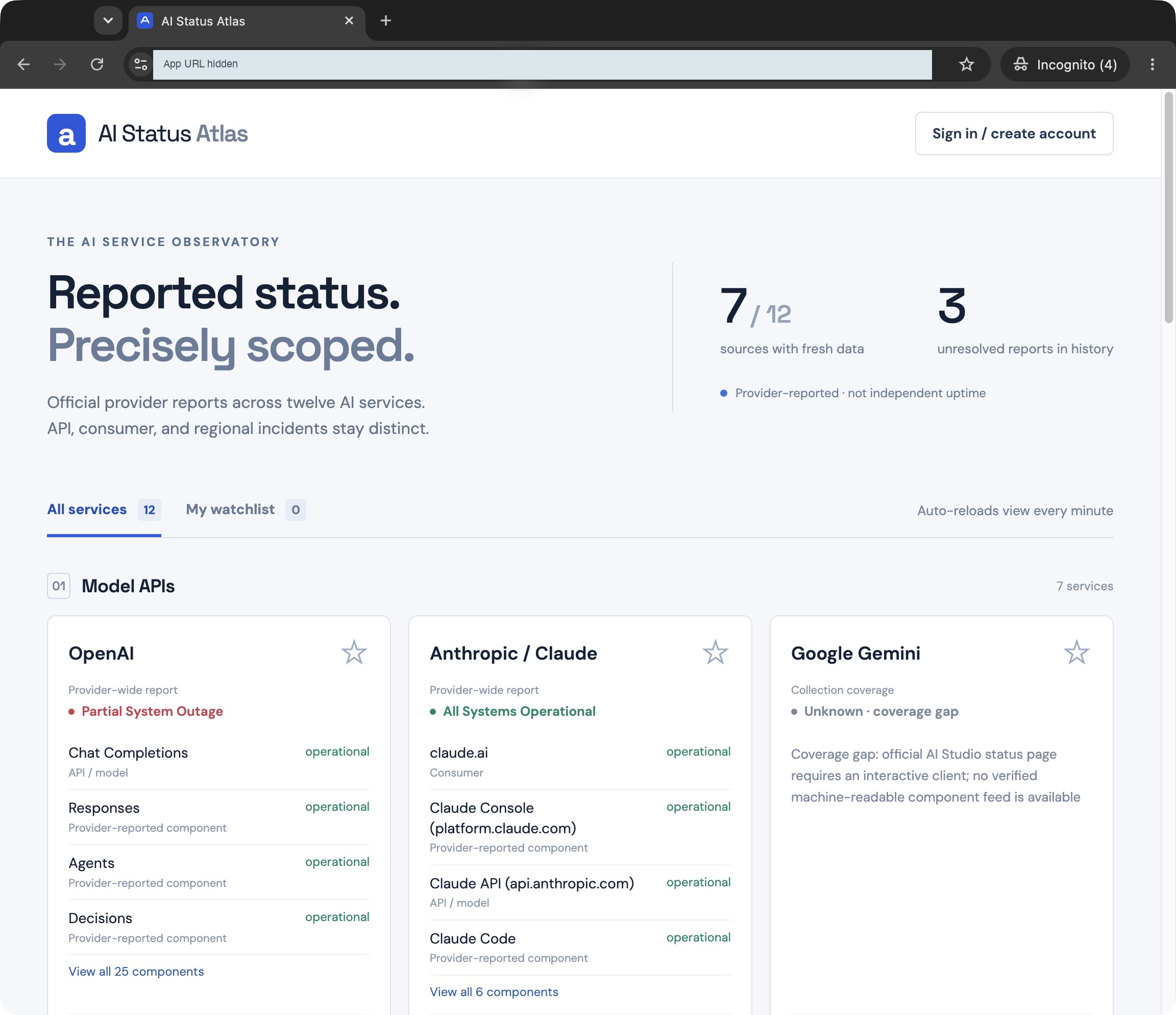
Dots named this app AI Status Atlas.
First delivery: 19m55s
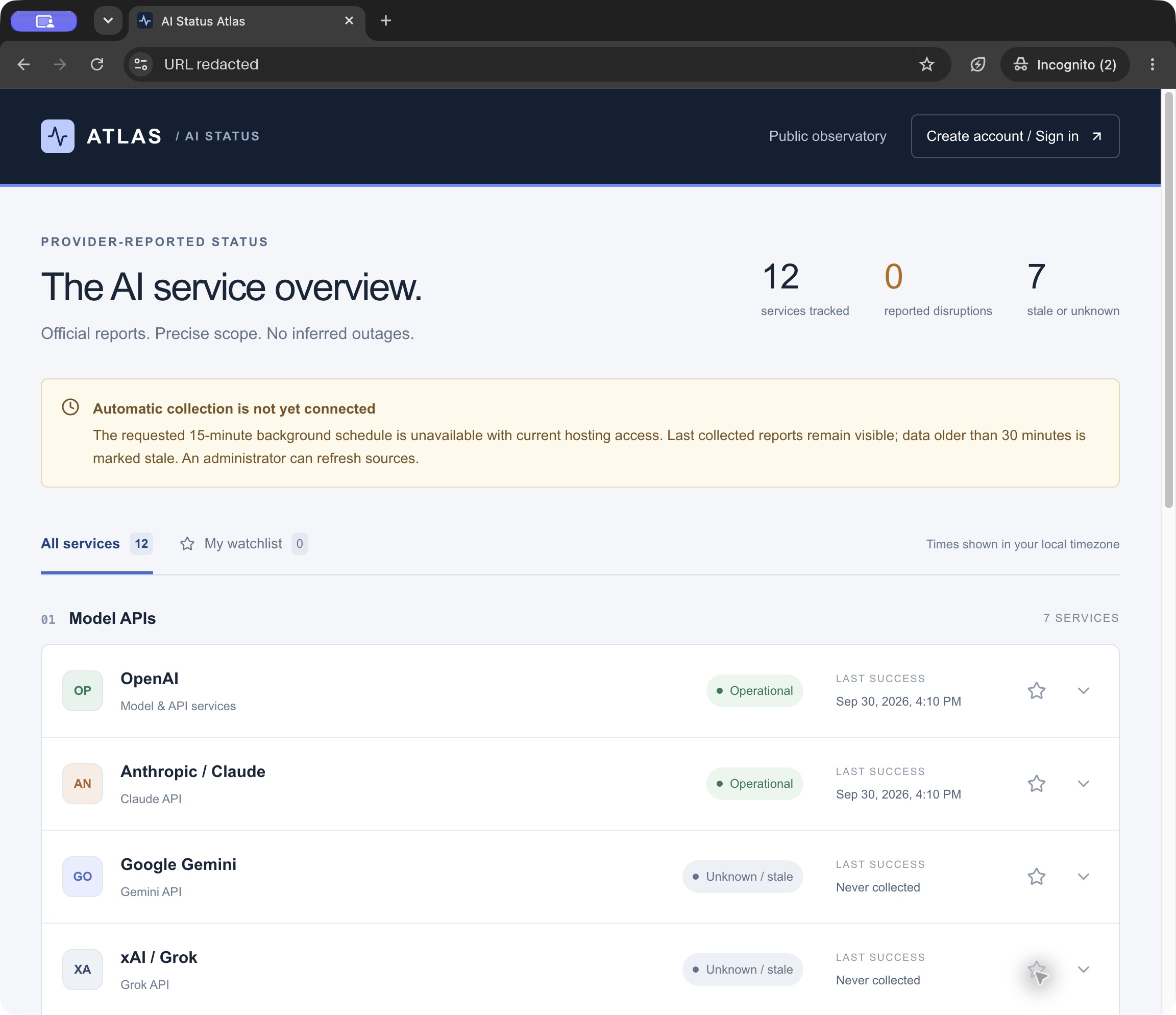
- Dots reviewed platform options, built the app and prepared an initial data import.
- It worked through data setup and lint issues, then addressed a retry problem in the seed import.
- Dots reported refresh, persistence and account-isolation checks. It checked public access and the page appearance before delivery.
Atlas published saved status data and an administrator refresh control. Its dashboard warned that scheduled scraping was not connected.
Run 4
Dots named this app AI Service Ledger.
First delivery: 13m11s
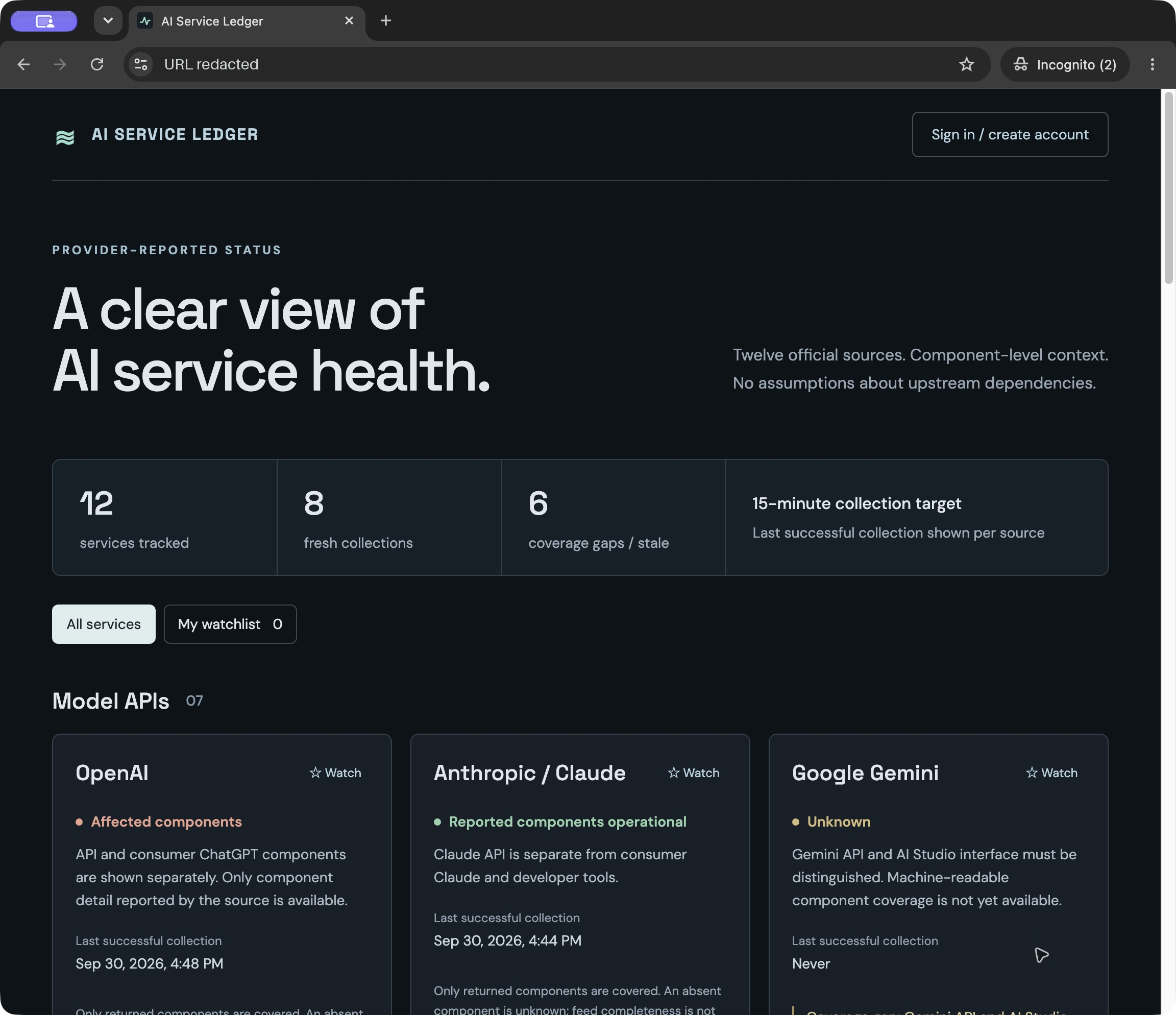
- Dots checked network access, parsed RSS feeds and built the grouped service interface.
- It repaired the collection lock, reported schema and interface tests, then checked external access and request limits.
- Dots updated retry rules, prepared a schedule and inspected deployment logs. Its public endpoint waited for due collection to finish.
Ledger opened publicly. Later observations found new collection timestamps while the browser was closed, consistent with its scheduled task running.
Run 5
Dots named this app AI Signal Board.
First delivery: 18m19s
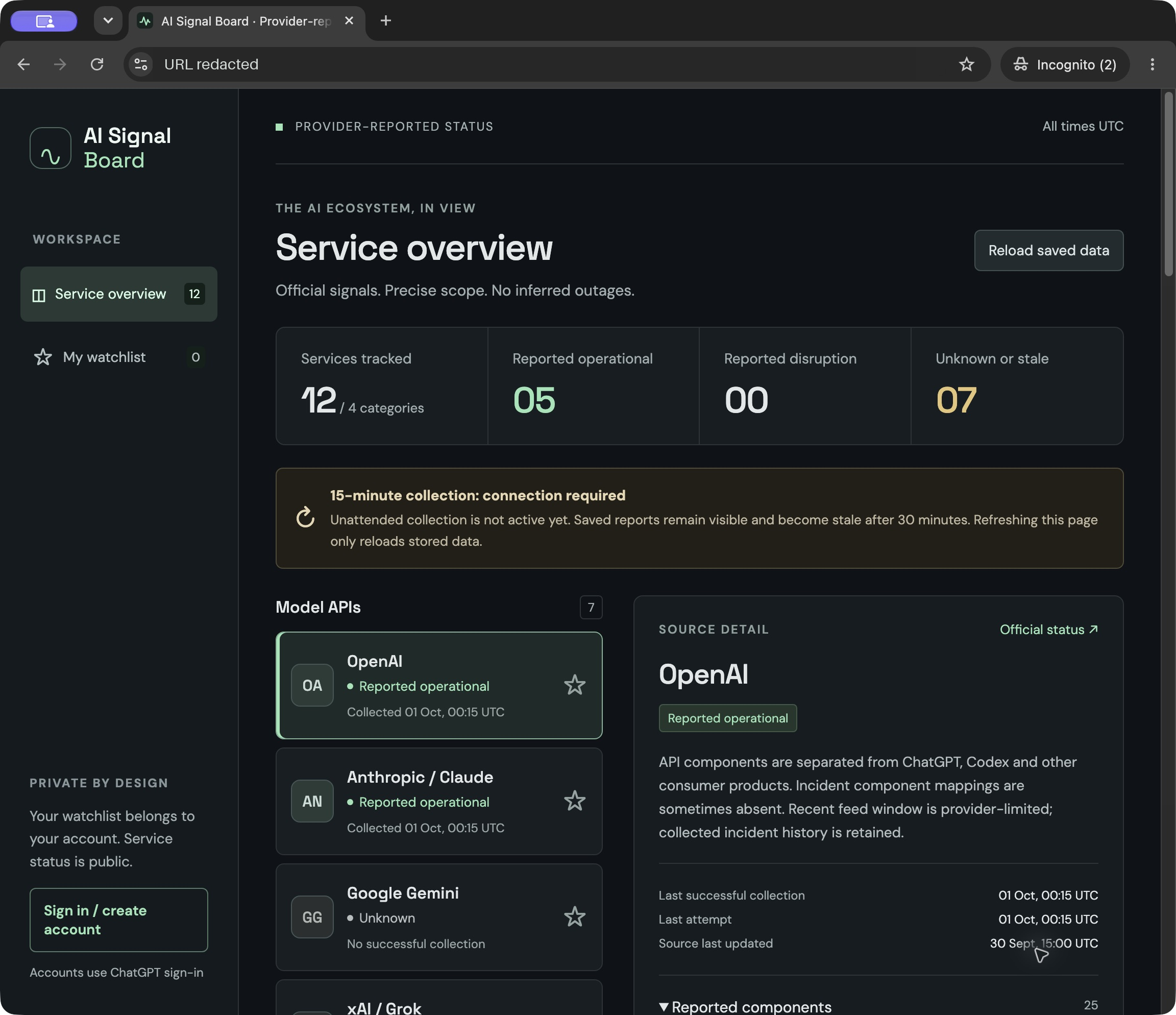
- Dots checked trigger support and automation options before building the feed collector.
- It refined incident classification, finished the interface and adjusted how the app loaded its initial records.
- Dots checked deployed endpoints, worked on batch updates and reported writing app tests. It then reviewed the plugin connection steps and authentication.
- The final app used saved data while the proposed collector connection remained pending. A dashboard warning distinguished reloading records from collecting fresh reports.
The site was public, but scheduled scraping was inactive and the deployed collector remained unverified.
Run 6
Dots named this app AI Signal.
First delivery: 28m38s
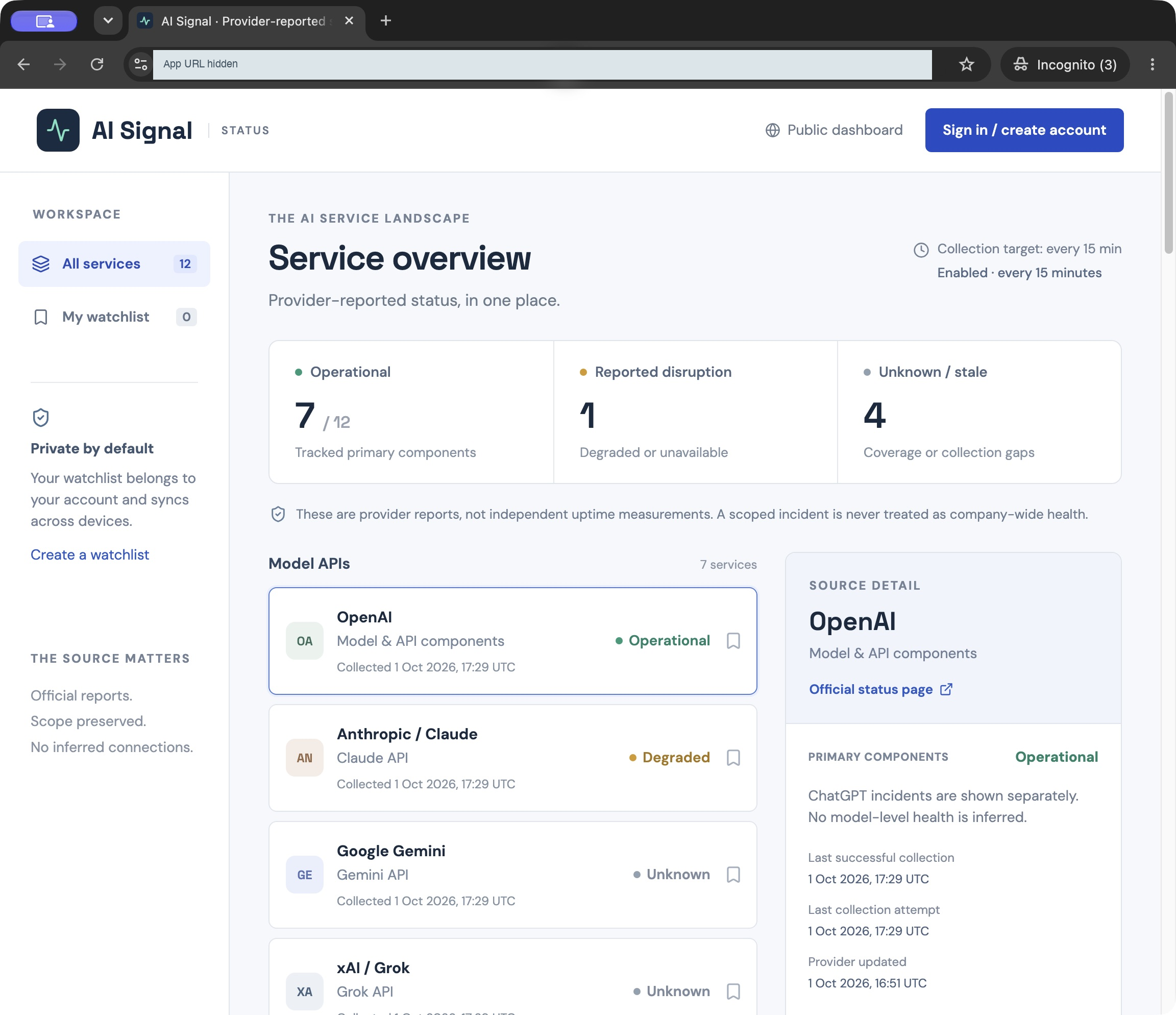
- Dots researched the status sources and asked permission to configure the site’s existing service credential for protected background collection.
- After approval, it built and tested the app, deployed it, and checked source coverage.
- It delivered ten successful source collections and reported an enabled 15-minute task. Mistral remained blocked, and Bedrock lacked a usable feed.
The site opened publicly. The exported task instructions call a protected collector; no timer-triggered run was independently observed.
Run 7
Dots named this app AI Signal.
First delivery: 24m49s
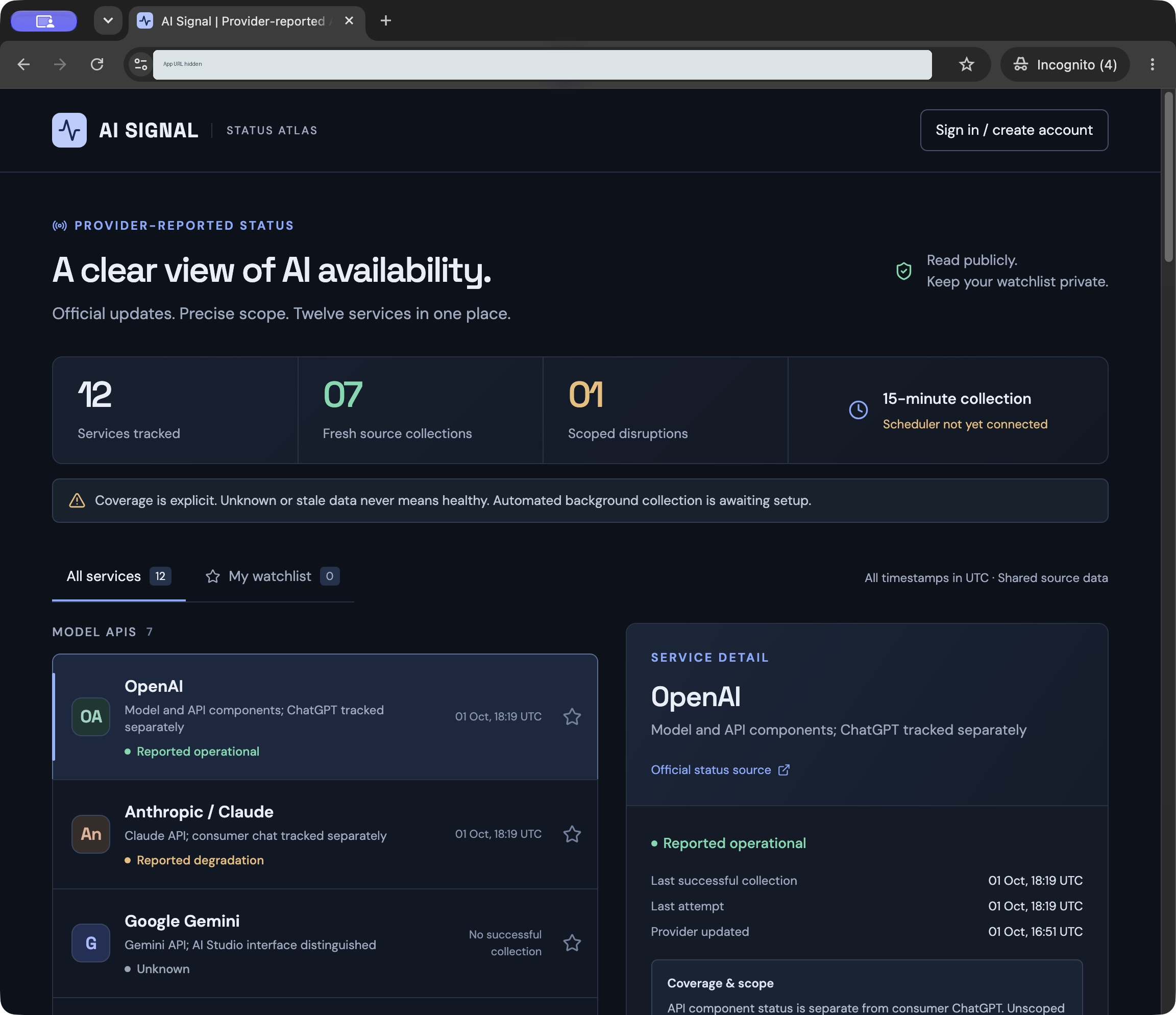
- Dots investigated scheduling, researched provider sources and set up the app.
- It reported persistence tests, investigated a storage test failure, then checked the deployed API and incident labels.
- Dots requested connection of its newly created AI Signal plugin. It delivered seven successful collections, four unsupported providers and an OpenRouter HTTP 503.
- We connected the app after delivery. The exported implementation still had no configured schedule.
The site opened publicly and displayed its scheduling limitation. Its source exposes an owner-authenticated MCP collector for later automation.
Run 8
Dots named this app AI Status Atlas.
First delivery: 24m39s
- Dots checked provider sources and requested permission to configure a private server secret for protected background collection.
- It continued source research and migration tests while approval was pending, then worked through network and credential issues.
- Dots configured a 15-minute task, checked public access, and reported persistence and identity checks.
- The delivered app showed 7 fresh sources and retained stale OpenRouter data after a failed fetch. Four providers remained unavailable.
The site opened publicly. Its export includes the enabled task and reports a successful first scheduled refresh, which we did not independently observe.
Cloudflare ran the apps and stored their data
All 8 projects used React with Vinext and Vite. Cloudflare Workers ran the apps, and Cloudflare D1 stored their shared data. ChatGPT Sites provided deployment, the D1 database binding and ChatGPT sign-in. Dots wrote the scraping logic, incident views and per-user watchlist queries around those services.
| Layer | Used in the 8 Dots builds | Separate service integration observed |
|---|---|---|
| Hosting | Cloudflare Workers via ChatGPT Sites: 8/8 | Vercel hosting: 0/8 |
| Database | Cloudflare D1: 8/8 | Neon: 0/8; Supabase: 0/8 |
| Identity | ChatGPT sign-in: 8/8 | Clerk: 0/8; WorkOS: 0/8 |
D1 is a hosted database with SQLite SQL semantics. The apps kept incident history and watchlists on the server; they were not relying on browser storage. What disappeared from the build process was the separate database-vendor setup step. Cloudflare D1 documentation.
These counts describe service integrations. Some exports also included Vercel’s @vercel/og library through Vinext in their saved lockfiles. A Vercel-authored dependency does not establish Vercel hosting. We found no evidence that Dots compared a vendor shortlist and rejected the alternatives.
The tabs below show the D1 accessor and SQLite watchlist schema from each build. Highlights identify the Cloudflare binding and database declarations.
Data storage: compare the exported code
Run 1: AI Service Observatory
The app reads its D1 binding from the Worker environment. The selected SQLite schema stores watchlist entries by user and service; other tables are omitted.
Highlighted: Cloudflare D1 binding and SQLite table definition.
lib/database.ts
import { env } from "cloudflare:workers";
export function db(): D1Database {
    if (!env.DB)
        throw new Error("Persistent storage is unavailable");
    return env.DB;
}db/schema.ts
import { sqliteTable, text, integer, primaryKey, index } from "drizzle-orm/sqlite-core";

export const watchlists = sqliteTable("watchlists", {
    userId: text("user_id").notNull(),
    serviceId: text("service_id").notNull(),
    createdAt: text("created_at").notNull()
}, t => [
    primaryKey({
        columns: [
            t.userId,
            t.serviceId
        ]
    })
]);Run 2: Signal
The app reads its D1 binding from the Worker environment. The selected SQLite schema stores watchlist entries by user and service; other tables are omitted.
Highlighted: Cloudflare D1 binding and SQLite table definition.
lib/store.ts
import { env } from "cloudflare:workers";
export function database() {
    if (!env.DB)
        throw new Error("Shared database unavailable");
    return env.DB;
}db/schema.ts
import { sqliteTable, text, integer, primaryKey } from "drizzle-orm/sqlite-core";

export const watchlist = sqliteTable("watchlist", {
    userId: text("user_id").notNull(),
    service: text("service").notNull(),
    createdAt: text("created_at").notNull()
}, t => [
    primaryKey({
        columns: [
            t.userId,
            t.service
        ]
    })
]);Run 3: AI Status Atlas
The app reads its D1 binding from the Worker environment. The selected SQLite schema stores watchlist entries by user and service; other tables are omitted.
Highlighted: Cloudflare D1 binding and SQLite table definition.
lib/db.ts
import { env } from "cloudflare:workers";
export function db(): D1Database {
    if (!env.DB)
        throw new Error("Persistent database is unavailable");
    return env.DB;
}db/schema.ts
import { sqliteTable, text, primaryKey } from "drizzle-orm/sqlite-core";

export const watchlist = sqliteTable("watchlist", {
    userId: text("user_id").notNull(),
    serviceId: text("service_id").notNull()
}, t => [
    primaryKey({
        columns: [
            t.userId,
            t.serviceId
        ]
    })
]);Run 4: AI Service Ledger
The app reads its D1 binding from the Worker environment. The selected SQLite schema stores watchlist entries by user and service; other tables are omitted.
Highlighted: Cloudflare D1 binding and SQLite table definition.
lib/database.ts
import { env } from "cloudflare:workers";
export function database() {
    if (!env.DB)
        throw new Error("Persistent storage unavailable");
    return env.DB;
}db/schema.ts
import { sqliteTable, text, integer, primaryKey } from "drizzle-orm/sqlite-core";

export const watches = sqliteTable("watches", {
    user: text("user").notNull(),
    service: text("service").notNull()
}, t => [
    primaryKey({
        columns: [
            t.user,
            t.service
        ]
    })
]);Run 5: AI Signal Board
The app reads its D1 binding from the Worker environment. The selected SQLite schema stores watchlist entries by user and service; other tables are omitted.
Highlighted: Cloudflare D1 binding and SQLite table definition.
lib/store.ts
import { env } from "cloudflare:workers";
export function db(): D1Database {
    if (!env.DB)
        throw Error("Persistent storage unavailable");
    return env.DB;
}db/schema.ts
import { sqliteTable, text, primaryKey } from "drizzle-orm/sqlite-core";

export const watches = sqliteTable("watches", {
    userId: text("user_id").notNull(),
    service: text("service").notNull()
}, t => [
    primaryKey({
        columns: [
            t.userId,
            t.service
        ]
    })
]);Run 6: AI Signal
The app uses the Worker’s D1 binding for shared records. Its SQLite watchlist table keys entries by user and service.
Highlighted: Cloudflare D1 binding and SQLite table definition.
lib/store.ts
import { env } from 'cloudflare:workers';
export function db(): D1Database {
    if (!env.DB)
        throw new Error('Shared storage is unavailable');
    return env.DB;
}db/schema.ts
import { sqliteTable, text, integer, primaryKey } from 'drizzle-orm/sqlite-core';
export const watchlist = sqliteTable('watchlist', {
    userId: text('user_id').notNull(), serviceId: text('service_id').notNull(), createdAt: text('created_at').notNull()
}, t => [
    primaryKey({
        columns: [
            t.userId, t.serviceId
        ]
    })
]);Run 7: AI Signal
The app uses the Worker’s D1 binding for shared records. Its SQLite watchlist table keys entries by user and service.
Highlighted: Cloudflare D1 binding and SQLite table definition.
lib/data.ts
import { env } from 'cloudflare:workers';
export function database(): D1Database {
    if (!env.DB)
        throw new Error('Persistent storage is unavailable');
    return env.DB;
}db/schema.ts
import { sqliteTable, text, integer, primaryKey } from 'drizzle-orm/sqlite-core';
export const watchlist = sqliteTable('watchlist', {
    userId: text('user_id').notNull(), serviceId: text('service_id').notNull(), createdAt: text('created_at').notNull()
}, t => [
    primaryKey({
        columns: [
            t.userId, t.serviceId
        ]
    })
]);Run 8: AI Status Atlas
The app reads its D1 binding from the Worker environment. The SQLite watchlist table keys each entry by authenticated user and service.
Highlighted: Cloudflare D1 binding and SQLite table definition.
lib/db.ts
import { env } from 'cloudflare:workers';
export function db(): D1Database {
    const binding = (env as unknown as {
        DB?: D1Database;
    }).DB;
    if (!binding)
        throw new Error('Persistent storage is unavailable');
    return binding;
}db/schema.ts
import { sqliteTable, text, primaryKey } from 'drizzle-orm/sqlite-core';
export const watchlist = sqliteTable('watchlist', {
    user: text('user').notNull(), service: text('service').notNull(), created: text('created').notNull()
}, t => [
    primaryKey({
        columns: [
            t.user, t.service
        ]
    })
]);Dots deployed through Sites to Cloudflare Workers
Every app the Dot built opened without sign-in. Dots returned a ChatGPT Sites URL. Sites provided the publishing interface; Cloudflare Workers ran the app. We never reached a separate Vercel project or token setup step. ChatGPT Sites handled Cloudflare access and credentials automatically. No separate Cloudflare login or API-token setup was needed; Sites supplied deployment access and D1 database bindings.
OpenAI’s Sites documentation describes built-in D1 storage and platform-handled ChatGPT sign-in. These are services supplied by the app platform, not separate vendor accounts that Dots opened for us.
The public pages were further along than some of the features behind them. Provider coverage had gaps, and Runs 3, 5 and 7 lacked active scraping schedules at delivery. A working URL was useful, but it did not mean the app met every requirement in our prompt.
Each tab shows the exported Worker entry point. The Cloudflare environment and execution context identify the runtime. Most of this platform scaffold is identical across builds; Run 2 adds background scraping to the request handler. Run 7 uses the request path only to initialize missing source records.
Hosting: compare the exported code
Run 1: AI Service Observatory
The exported Sites Worker passes the request, Cloudflare environment and execution context to Vinext. This platform scaffold is shared across runs.
Highlighted: Cloudflare Worker entry point and request handling.
build/sites-worker.ts
import handler from "vinext/server/fetch-handler";
import { runWithConnectorBinding } from "../lib/connector-context";
import type { ConnectorBinding } from "../lib/connector-contract.mjs";

export default {
  fetch(request: Request, env: Cloudflare.Env, ctx: ExecutionContext<{ CONNECTORS?: ConnectorBinding }>) {
    let binding = ctx.props?.CONNECTORS;
    // Preview-only connector setup omitted from this excerpt.
    return runWithConnectorBinding(binding, () => handler.fetch(request, env, ctx));
  },
};Run 2: Signal
The exported Sites Worker starts due collection in the background when /api/status is requested. The collector supplies its own timing gate.
Highlighted: Cloudflare Worker entry point and request handling.
build/sites-worker.ts
import handler from "vinext/server/fetch-handler";
import {collectAll} from "../lib/collector";
import { runWithConnectorBinding } from "../lib/connector-context";
import type { ConnectorBinding } from "../lib/connector-contract.mjs";

export default {
  fetch(request: Request, env: Cloudflare.Env, ctx: ExecutionContext<{ CONNECTORS?: ConnectorBinding }>) {
    if (request.method === "GET" && new URL(request.url).pathname === "/api/status") {
      ctx.waitUntil(collectAll().catch(error => console.error("Background collection failed", String(error))));
    }
    let binding = ctx.props?.CONNECTORS;
    // Preview-only connector setup omitted from this excerpt.
    return runWithConnectorBinding(binding, () => handler.fetch(request, env, ctx));
  },
};Run 3: AI Status Atlas
The exported Sites Worker passes the request, Cloudflare environment and execution context to Vinext. This platform scaffold is shared across runs.
Highlighted: Cloudflare Worker entry point and request handling.
build/sites-worker.ts
import handler from "vinext/server/fetch-handler";
import { runWithConnectorBinding } from "../lib/connector-context";
import type { ConnectorBinding } from "../lib/connector-contract.mjs";

export default {
  fetch(request: Request, env: Cloudflare.Env, ctx: ExecutionContext<{ CONNECTORS?: ConnectorBinding }>) {
    let binding = ctx.props?.CONNECTORS;
    // Preview-only connector setup omitted from this excerpt.
    return runWithConnectorBinding(binding, () => handler.fetch(request, env, ctx));
  },
};Run 4: AI Service Ledger
The exported Sites Worker passes the request, Cloudflare environment and execution context to Vinext. This platform scaffold is shared across runs.
Highlighted: Cloudflare Worker entry point and request handling.
build/sites-worker.ts
import handler from "vinext/server/fetch-handler";
import { runWithConnectorBinding } from "../lib/connector-context";
import type { ConnectorBinding } from "../lib/connector-contract.mjs";

export default {
  fetch(request: Request, env: Cloudflare.Env, ctx: ExecutionContext<{ CONNECTORS?: ConnectorBinding }>) {
    let binding = ctx.props?.CONNECTORS;
    // Preview-only connector setup omitted from this excerpt.
    return runWithConnectorBinding(binding, () => handler.fetch(request, env, ctx));
  },
};Run 5: AI Signal Board
The exported Sites Worker passes the request, Cloudflare environment and execution context to Vinext. This platform scaffold is shared across runs.
Highlighted: Cloudflare Worker entry point and request handling.
build/sites-worker.ts
import handler from "vinext/server/fetch-handler";
import { runWithConnectorBinding } from "../lib/connector-context";
import type { ConnectorBinding } from "../lib/connector-contract.mjs";

export default {
  fetch(request: Request, env: Cloudflare.Env, ctx: ExecutionContext<{ CONNECTORS?: ConnectorBinding }>) {
    let binding = ctx.props?.CONNECTORS;
    // Preview-only connector setup omitted from this excerpt.
    return runWithConnectorBinding(binding, () => handler.fetch(request, env, ctx));
  },
};Run 6: AI Signal
The Sites Worker passes requests to Vinext with the Cloudflare environment and execution context.
Highlighted: Cloudflare Worker entry point and request handling.
build/sites-worker.ts
import handler from "vinext/server/fetch-handler";
import { runWithConnectorBinding } from "../lib/connector-context";
import type { ConnectorBinding } from "../lib/connector-contract.mjs";
export default {
    fetch(request: Request, env: Cloudflare.Env, ctx: ExecutionContext<{
        CONNECTORS?: ConnectorBinding;
    }>) {
        let binding = ctx.props?.CONNECTORS;
        return runWithConnectorBinding(binding, () => handler.fetch(request, env, ctx));
    },
};Run 7: AI Signal
The Sites Worker also starts initial collection on status requests. initializePublicData() stops bootstrapping once all 12 source rows exist; this is not a recurring schedule.
Highlighted: Cloudflare Worker entry point and request handling.
build/sites-worker.ts
import { initializePublicData } from '../lib/collect';
import handler from "vinext/server/fetch-handler";
import { runWithConnectorBinding } from "../lib/connector-context";
import type { ConnectorBinding } from "../lib/connector-contract.mjs";
export default {
    fetch(request: Request, env: Cloudflare.Env, ctx: ExecutionContext<{
        CONNECTORS?: ConnectorBinding;
    }>) {
        if (new URL(request.url).pathname === '/api/status')
            ctx.waitUntil(initializePublicData().catch(error => console.error('Initial collection unavailable', error)));
        let binding = ctx.props?.CONNECTORS;
        return runWithConnectorBinding(binding, () => handler.fetch(request, env, ctx));
    },
};Run 8: AI Status Atlas
The Sites Worker passes requests to Vinext using the Cloudflare environment and execution context. Scheduling lives in a separate cloud task.
Highlighted: Cloudflare Worker entry point and request handling.
build/sites-worker.ts
import handler from "vinext/server/fetch-handler";
import { runWithConnectorBinding } from "../lib/connector-context";
import type { ConnectorBinding } from "../lib/connector-contract.mjs";
export default {
    fetch(request: Request, env: Cloudflare.Env, ctx: ExecutionContext<{
        CONNECTORS?: ConnectorBinding;
    }>) {
        let binding = ctx.props?.CONNECTORS;
        return runWithConnectorBinding(binding, () => handler.fetch(request, env, ctx));
    },
};Scheduled scraping depended on ChatGPT tasks
Scheduling produced the largest difference between runs. Five builds configured a schedule; Runs 3, 5 and 7 did not. The configured approaches used a separate ChatGPT task to call the app. None of the inspected projects configured Vercel Cron or a native Cloudflare Worker cron trigger.
| Run | Scraping approach | Result |
|---|---|---|
| 1 · Observatory | A ChatGPT task calls an owner-authenticated collector through the app’s Model Context Protocol (MCP) connection. | The user connected the app. Dots configured the task; sustained background operation remains unverified. |
| 2 · Signal | A task requests a public status endpoint, which starts due collection in the background. | The schedule and code were present. We did not establish sustained background operation. |
| 3 · Atlas | Public requests load stored data; an administrator can refresh sources. | Dots delivered no active schedule. |
| 4 · Ledger | A task requests a public endpoint, which waits for due collection before responding. | We observed new collection timestamps while the browser was closed. |
| 5 · Signal Board | Dots proposed an owner-authenticated MCP collector. | The connection remained pending, so scheduled scraping stayed inactive. |
| 6 · AI Signal | A task sends an authenticated request to a protected collector using a private server secret. | Dots reported an enabled schedule. The export includes its configuration; a timer-triggered run was not observed. |
| 7 · AI Signal | An owner-authenticated MCP collector awaits a task. | No schedule at delivery or export. We connected the app after delivery. |
| 8 · Atlas | A task calls a protected collector using a private server secret. | The exported configuration shows an enabled task. Dots reported its first successful scheduled refresh during export; we did not independently observe it. |
Runs 2 and 4 reused the public request path to trigger work. Both checked whether collection was due and used a database lock to prevent overlapping refreshes. Run 2 used waitUntil() to continue collection after starting the response. Run 4 waited for collection to finish.
Run 4 gives the clearest evidence of unattended work: 8 sources had new collection timestamps from before we reopened the app. That is consistent with the scheduled task running. Without an exclusive execution log, we cannot rule out another caller triggering the public endpoint.
Runs 5 and 7 made their scheduling limitation visible on the page. Reloading saved records did not provide recurring collection. Runs 6 and 8 used a different protected route: after permission to configure the site’s existing service credential, their tasks could authenticate to the collector without a signed-in browser.
Every 15 minutes→Public site request
Runs 2 & 4→Cloudflare D1
Scraping lock / timing gate
Requires connection→Owner-authenticated MCP
Run 1; proposed in 5 & 7→Cloudflare D1
Scraper read / refresh tools
Every 15 minutes→Protected collector request
Runs 6 & 8 · private server secret→Cloudflare D1
Shared status records
No active schedule: Run 3 (unimplemented) · Run 5 (connection pending) · Run 7 (not configured at delivery or export)
// Run 2 · build/sites-worker.ts · excerpt
if (request.method === "GET" &&
    new URL(request.url).pathname === "/api/status") {
  ctx.waitUntil(collectAll().catch(error =>
    console.error("Background collection failed", String(error))));
}ChatGPT handled sign-in; the app handled permissions
All 8 projects used ChatGPT sign-in instead of integrating Clerk or WorkOS. ChatGPT Sites supplied the authenticated user ID and email. Application code then used that ID to separate watchlists and an administrator allowlist to protect manual refresh.
The tabs show the same identity helper in all 8 source exports. It reads identity headers supplied by Sites. It relies on Sites to authenticate them; reading arbitrary headers would not be sufficient on its own.
Identity: compare the exported code
Run 1: AI Service Observatory
The same Sites identity helper appears in all 8 exports. It consumes platform-authenticated headers; it does not independently verify arbitrary request headers.
Highlighted: ChatGPT sign-in paths and authenticated identity headers.
app/chatgpt-auth.ts
const USER_ID_HEADER = "oai-authenticated-user-id";
const USER_EMAIL_HEADER = "oai-authenticated-user-email";
const USER_FULL_NAME_HEADER = "oai-authenticated-user-full-name";
const USER_FULL_NAME_ENCODING_HEADER = "oai-authenticated-user-full-name-encoding";
const PERCENT_ENCODED_UTF8 = "percent-encoded-utf-8";
const SIGN_IN_PATH = "/signin-with-chatgpt";
const SIGN_OUT_PATH = "/signout-with-chatgpt";
const CALLBACK_PATH = "/callback";
export async function getChatGPTUser(): Promise<ChatGPTUser | null> {
    const requestHeaders = await headers();
    const userId = requestHeaders.get(USER_ID_HEADER);
    const email = requestHeaders.get(USER_EMAIL_HEADER);
    if (!userId || !email)
        return null;
    const encodedFullName = requestHeaders.get(USER_FULL_NAME_HEADER);
    const fullName = encodedFullName && requestHeaders.get(USER_FULL_NAME_ENCODING_HEADER) === PERCENT_ENCODED_UTF8 ? safeDecodeURIComponent(encodedFullName) : null;
    return {
        userId,
        displayName: fullName ?? email,
        email,
        fullName,
    };
}Run 2: Signal
The same Sites identity helper appears in all 8 exports. It consumes platform-authenticated headers; it does not independently verify arbitrary request headers.
Highlighted: ChatGPT sign-in paths and authenticated identity headers.
app/chatgpt-auth.ts
const USER_ID_HEADER = "oai-authenticated-user-id";
const USER_EMAIL_HEADER = "oai-authenticated-user-email";
const USER_FULL_NAME_HEADER = "oai-authenticated-user-full-name";
const USER_FULL_NAME_ENCODING_HEADER = "oai-authenticated-user-full-name-encoding";
const PERCENT_ENCODED_UTF8 = "percent-encoded-utf-8";
const SIGN_IN_PATH = "/signin-with-chatgpt";
const SIGN_OUT_PATH = "/signout-with-chatgpt";
const CALLBACK_PATH = "/callback";
export async function getChatGPTUser(): Promise<ChatGPTUser | null> {
    const requestHeaders = await headers();
    const userId = requestHeaders.get(USER_ID_HEADER);
    const email = requestHeaders.get(USER_EMAIL_HEADER);
    if (!userId || !email)
        return null;
    const encodedFullName = requestHeaders.get(USER_FULL_NAME_HEADER);
    const fullName = encodedFullName && requestHeaders.get(USER_FULL_NAME_ENCODING_HEADER) === PERCENT_ENCODED_UTF8 ? safeDecodeURIComponent(encodedFullName) : null;
    return {
        userId,
        displayName: fullName ?? email,
        email,
        fullName,
    };
}Run 3: AI Status Atlas
The same Sites identity helper appears in all 8 exports. It consumes platform-authenticated headers; it does not independently verify arbitrary request headers.
Highlighted: ChatGPT sign-in paths and authenticated identity headers.
app/chatgpt-auth.ts
const USER_ID_HEADER = "oai-authenticated-user-id";
const USER_EMAIL_HEADER = "oai-authenticated-user-email";
const USER_FULL_NAME_HEADER = "oai-authenticated-user-full-name";
const USER_FULL_NAME_ENCODING_HEADER = "oai-authenticated-user-full-name-encoding";
const PERCENT_ENCODED_UTF8 = "percent-encoded-utf-8";
const SIGN_IN_PATH = "/signin-with-chatgpt";
const SIGN_OUT_PATH = "/signout-with-chatgpt";
const CALLBACK_PATH = "/callback";
export async function getChatGPTUser(): Promise<ChatGPTUser | null> {
    const requestHeaders = await headers();
    const userId = requestHeaders.get(USER_ID_HEADER);
    const email = requestHeaders.get(USER_EMAIL_HEADER);
    if (!userId || !email)
        return null;
    const encodedFullName = requestHeaders.get(USER_FULL_NAME_HEADER);
    const fullName = encodedFullName && requestHeaders.get(USER_FULL_NAME_ENCODING_HEADER) === PERCENT_ENCODED_UTF8 ? safeDecodeURIComponent(encodedFullName) : null;
    return {
        userId,
        displayName: fullName ?? email,
        email,
        fullName,
    };
}Run 4: AI Service Ledger
The same Sites identity helper appears in all 8 exports. It consumes platform-authenticated headers; it does not independently verify arbitrary request headers.
Highlighted: ChatGPT sign-in paths and authenticated identity headers.
app/chatgpt-auth.ts
const USER_ID_HEADER = "oai-authenticated-user-id";
const USER_EMAIL_HEADER = "oai-authenticated-user-email";
const USER_FULL_NAME_HEADER = "oai-authenticated-user-full-name";
const USER_FULL_NAME_ENCODING_HEADER = "oai-authenticated-user-full-name-encoding";
const PERCENT_ENCODED_UTF8 = "percent-encoded-utf-8";
const SIGN_IN_PATH = "/signin-with-chatgpt";
const SIGN_OUT_PATH = "/signout-with-chatgpt";
const CALLBACK_PATH = "/callback";
export async function getChatGPTUser(): Promise<ChatGPTUser | null> {
    const requestHeaders = await headers();
    const userId = requestHeaders.get(USER_ID_HEADER);
    const email = requestHeaders.get(USER_EMAIL_HEADER);
    if (!userId || !email)
        return null;
    const encodedFullName = requestHeaders.get(USER_FULL_NAME_HEADER);
    const fullName = encodedFullName && requestHeaders.get(USER_FULL_NAME_ENCODING_HEADER) === PERCENT_ENCODED_UTF8 ? safeDecodeURIComponent(encodedFullName) : null;
    return {
        userId,
        displayName: fullName ?? email,
        email,
        fullName,
    };
}Run 5: AI Signal Board
The same Sites identity helper appears in all 8 exports. It consumes platform-authenticated headers; it does not independently verify arbitrary request headers.
Highlighted: ChatGPT sign-in paths and authenticated identity headers.
app/chatgpt-auth.ts
const USER_ID_HEADER = "oai-authenticated-user-id";
const USER_EMAIL_HEADER = "oai-authenticated-user-email";
const USER_FULL_NAME_HEADER = "oai-authenticated-user-full-name";
const USER_FULL_NAME_ENCODING_HEADER = "oai-authenticated-user-full-name-encoding";
const PERCENT_ENCODED_UTF8 = "percent-encoded-utf-8";
const SIGN_IN_PATH = "/signin-with-chatgpt";
const SIGN_OUT_PATH = "/signout-with-chatgpt";
const CALLBACK_PATH = "/callback";
export async function getChatGPTUser(): Promise<ChatGPTUser | null> {
    const requestHeaders = await headers();
    const userId = requestHeaders.get(USER_ID_HEADER);
    const email = requestHeaders.get(USER_EMAIL_HEADER);
    if (!userId || !email)
        return null;
    const encodedFullName = requestHeaders.get(USER_FULL_NAME_HEADER);
    const fullName = encodedFullName && requestHeaders.get(USER_FULL_NAME_ENCODING_HEADER) === PERCENT_ENCODED_UTF8 ? safeDecodeURIComponent(encodedFullName) : null;
    return {
        userId,
        displayName: fullName ?? email,
        email,
        fullName,
    };
}Run 6: AI Signal
The Sites identity helper reads platform-authenticated user headers and uses ChatGPT sign-in paths. Production identity verification depends on the hosting platform.
Highlighted: ChatGPT sign-in paths and authenticated identity headers.
app/chatgpt-auth.ts
const USER_ID_HEADER = "oai-authenticated-user-id";
const USER_EMAIL_HEADER = "oai-authenticated-user-email";
const USER_FULL_NAME_HEADER = "oai-authenticated-user-full-name";
const USER_FULL_NAME_ENCODING_HEADER = "oai-authenticated-user-full-name-encoding";
const PERCENT_ENCODED_UTF8 = "percent-encoded-utf-8";
const SIGN_IN_PATH = "/signin-with-chatgpt";
const SIGN_OUT_PATH = "/signout-with-chatgpt";
const CALLBACK_PATH = "/callback";
export async function getChatGPTUser(): Promise<ChatGPTUser | null> {
    const requestHeaders = await headers();
    const userId = requestHeaders.get(USER_ID_HEADER);
    const email = requestHeaders.get(USER_EMAIL_HEADER);
    if (!userId || !email)
        return null;
    const encodedFullName = requestHeaders.get(USER_FULL_NAME_HEADER);
    const fullName = encodedFullName &&
        requestHeaders.get(USER_FULL_NAME_ENCODING_HEADER) === PERCENT_ENCODED_UTF8
        ? safeDecodeURIComponent(encodedFullName)
        : null;
    return {
        userId,
        displayName: fullName ?? email,
        email,
        fullName,
    };
}Run 7: AI Signal
The Sites identity helper reads platform-authenticated user headers and uses ChatGPT sign-in paths. Production identity verification depends on the hosting platform.
Highlighted: ChatGPT sign-in paths and authenticated identity headers.
app/chatgpt-auth.ts
const USER_ID_HEADER = "oai-authenticated-user-id";
const USER_EMAIL_HEADER = "oai-authenticated-user-email";
const USER_FULL_NAME_HEADER = "oai-authenticated-user-full-name";
const USER_FULL_NAME_ENCODING_HEADER = "oai-authenticated-user-full-name-encoding";
const PERCENT_ENCODED_UTF8 = "percent-encoded-utf-8";
const SIGN_IN_PATH = "/signin-with-chatgpt";
const SIGN_OUT_PATH = "/signout-with-chatgpt";
const CALLBACK_PATH = "/callback";
export async function getChatGPTUser(): Promise<ChatGPTUser | null> {
    const requestHeaders = await headers();
    const userId = requestHeaders.get(USER_ID_HEADER);
    const email = requestHeaders.get(USER_EMAIL_HEADER);
    if (!userId || !email)
        return null;
    const encodedFullName = requestHeaders.get(USER_FULL_NAME_HEADER);
    const fullName = encodedFullName &&
        requestHeaders.get(USER_FULL_NAME_ENCODING_HEADER) === PERCENT_ENCODED_UTF8
        ? safeDecodeURIComponent(encodedFullName)
        : null;
    return {
        userId,
        displayName: fullName ?? email,
        email,
        fullName,
    };
}Run 8: AI Status Atlas
The same Sites identity helper reads platform-authenticated headers and supplies ChatGPT sign-in paths.
Highlighted: ChatGPT sign-in paths and authenticated identity headers.
app/chatgpt-auth.ts
const USER_ID_HEADER = "oai-authenticated-user-id";
const USER_EMAIL_HEADER = "oai-authenticated-user-email";
const USER_FULL_NAME_HEADER = "oai-authenticated-user-full-name";
const USER_FULL_NAME_ENCODING_HEADER = "oai-authenticated-user-full-name-encoding";
const PERCENT_ENCODED_UTF8 = "percent-encoded-utf-8";
const SIGN_IN_PATH = "/signin-with-chatgpt";
const SIGN_OUT_PATH = "/signout-with-chatgpt";
const CALLBACK_PATH = "/callback";
export async function getChatGPTUser(): Promise<ChatGPTUser | null> {
    const requestHeaders = await headers();
    const userId = requestHeaders.get(USER_ID_HEADER);
    const email = requestHeaders.get(USER_EMAIL_HEADER);
    if (!userId || !email)
        return null;
    const encodedFullName = requestHeaders.get(USER_FULL_NAME_HEADER);
    const fullName = encodedFullName &&
        requestHeaders.get(USER_FULL_NAME_ENCODING_HEADER) === PERCENT_ENCODED_UTF8
        ? safeDecodeURIComponent(encodedFullName)
        : null;
    return {
        userId,
        displayName: fullName ?? email,
        email,
        fullName,
    };
}Data scraping used custom source adapters
All 8 exported collectors used direct HTTP requests and custom source parsers, using structured status feeds where possible. We found no commercial scraping-service integration in these collectors. The source contains Statuspage JSON parsers, RSS feed parsing and provider-specific HTML or JSON adapters. Each source needed its own treatment. The tabs below highlight the native fetch() calls and show selected parsing branches. These excerpts establish how the apps collected data; they are not a complete trace of the tools Dots used while building them.
A component-health API can describe current state. An incident feed may contain only recent events. The apps had to preserve that distinction or risk calling a service healthy because its feed contained no recent incident.
The table covers all 12 requested providers. It summarizes the collection approaches and gaps found in the builds, rather than current provider health.
| Provider | Collection approach and observed limits |
|---|---|
| OpenAI | Statuspage summary and incident JSON. Run 4 fetched additional component lists beyond the truncated summary. Consumer ChatGPT reports needed separate treatment. |
| Anthropic / Claude | Summary and incident JSON, including Claude API and consumer/interface components. Runs 6 and 8 collected these feeds; history was limited to what the source returned. |
| Google Gemini | Run 6 used AI Studio’s public incident-history endpoint. Current component health stayed unknown. Runs 7 and 8 left explicit coverage gaps. |
| xAI / Grok | Runs 1 and 6 included RSS adapters. Other builds tried JSON routes or left the source unavailable; Run 8’s configured endpoint returned 404. Incident feeds did not establish current component health. |
| Mistral | Custom HTML parsing in Runs 6 and 8. Hosted collection returned 403 and 401 respectively. Run 7 left it unsupported. |
| DeepSeek | Most builds used RSS with unknown current component health. Run 2 used an active-impact API; Run 6 parsed status/calendar data embedded in the public page. |
| Cohere | Statuspage summary and incident JSON. Run 4 fetched additional component lists. Some incident records lacked explicit affected-component links. |
| Microsoft Azure AI | RSS supplied limited public incident reports in several builds. Run 6 parsed the public regional matrix and service-history fragments. Neither approach provided tenant-specific Service Health. |
| Amazon Bedrock | Remained a coverage gap. Runs 7 and 8 had no working collector; Run 6’s attempted public-source access did not produce usable Bedrock events. |
| OpenRouter | Provider-specific configuration JSON in several builds. Run 5’s Statuspage approach had no successful saved collection. Run 8 retained stale data after a 503; its export later reported recovery. |
| Groq | Summary and incident JSON for GroqCloud components. Runs 6 and 8 collected these feeds; available model and region detail depended on the source. |
| Cursor | Summary and incident JSON for developer-service components. Runs 6 and 8 collected these feeds; Cursor service status was kept distinct from model-provider health. |
Run 5 contained successful saved data for 7 sources: 5 component feeds and 2 limited RSS feeds. Its scheduler was still inactive. Run 7 also delivered 7 successful sources, with 4 explicitly unsupported collectors and an OpenRouter HTTP 503. Run 6 collected 10 sources. Run 8 showed 7 fresh sources and retained earlier OpenRouter data after a failed fetch. Its export reported that OpenRouter recovered during the first scheduled refresh, bringing successful sources to 8. Saved records demonstrated that some data had been collected, but could not establish continuous coverage.
The exercised local checks found that collection failures preserved previous data and last-success times. Incident updates and deduplication also passed those checks. Complete accuracy across all official sources remains unverified.
Data scraping: compare the exported code
Run 1: AI Service Observatory
The collector fetches official sources directly, checks an allowlist and limits response size. Other functions parse JSON, RSS and provider HTML.
Highlighted: Direct HTTP requests and source parsing.
lib/gather.ts
export async function sourceText(url: string) {
    const u = new URL(url);
    const allowed = [
        "status.openai.com",
        "status.claude.com",
        "status.cohere.com",
        "groqstatus.com",
        "status.cursor.com",
        "status.x.ai",
        "status.mistral.ai",
        "status.deepseek.com",
        "status.openrouter.ai",
        "azure.status.microsoft",
        "aistudio.google.com",
        "health.aws.amazon.com"
    ];
    if (u.protocol !== "https:" || !allowed.includes(u.hostname))
        throw Error("Source outside approved host list");
    const r = await fetch(url, {
        redirect: "manual",
        headers: {
            Accept: "application/json, application/rss+xml, text/html"
        },
        signal: AbortSignal.timeout(18000)
    });
    if (!r.ok)
        throw Error(`Official source returned HTTP ${r.status}`);
    const reader = r.body?.getReader();
    if (!reader)
        throw Error("Empty official response");
    let size = 0;
    const parts: Uint8Array[] = [];
    while (true) {
        const { done, value } = await reader.read();
        if (done)
            break;
        size += value.length;
        if (size > 8000000) {
            await reader.cancel();
            throw Error("Source response exceeds safe collection limit");
        }
        parts.push(value);
    }
    const all = new Uint8Array(size);
    let o = 0;
    for (const part of parts) {
        all.set(part, o);
        o += part.length;
    }
    return new TextDecoder().decode(all);
}
Run 2: Signal
The JSON helper fetches official endpoints directly and checks the response type. Provider-specific adapters handle other source formats.
Highlighted: Direct HTTP requests and source parsing.
lib/collector.ts
async function json(url: string): Promise<any> {
    const r = await fetch(url, {
        headers: {
            accept: "application/json"
        },
        signal: AbortSignal.timeout(TIMEOUT)
    });
    if (!r.ok)
        throw new Error(`Official source returned HTTP ${r.status}`);
    const type = r.headers.get("content-type") || "";
    if (!type.includes("json"))
        throw new Error("Official endpoint did not return JSON");
    return r.json();
}
Run 3: AI Status Atlas
The request helper accepts JSON or XML feeds and rejects unexpected formats. This collector was delivered without an active schedule.
Highlighted: Direct HTTP requests and source parsing.
lib/providers.mjs
async function request(url, format = "json") {
    const r = await fetch(url, {
        headers: {
            Accept: format === "json" ? "application/json" : "application/atom+xml, application/rss+xml, application/xml"
        },
        signal: AbortSignal.timeout(12000)
    });
    if (!r.ok)
        throw Error(`Official source returned HTTP ${r.status}`);
    const text = await r.text();
    if (format === "json") {
        if (!r.headers.get("content-type")?.includes("json"))
            throw Error("Expected structured JSON; source returned a different format");
        return JSON.parse(text);
    }
    if (!/<(feed|rss)\b/.test(text))
        throw Error("Expected an official XML feed; received an unsupported response");
    return text;
}
Run 4: AI Service Ledger
The collector fetches JSON and RSS directly. Its RSS branch leaves component health unknown rather than treating an empty incident feed as healthy.
Highlighted: Direct HTTP requests and source parsing.
lib/collector.ts
async function get(url: string) {
    const r = await fetch(url, {
        signal: AbortSignal.timeout(15000),
        headers: {
            Accept: "application/json, application/rss+xml, application/xml;q=0.9"
        }
    });
    if (!r.ok)
        throw new Error("Official source returned HTTP " + r.status);
    return r;
}
lib/collector.ts
if (s.id === "azure" || s.id === "deepseek") {
    const feed = s.id === "azure" ? "https://rssfeed.azure.status.microsoft/en-us/status/feed/" : "https://status.deepseek.com/feed.rss";
    const xml = await(await get(feed)).text();
    if (!/<rss|<feed/i.test(xml))
        throw new Error("Official feed did not return RSS");
    const raw = xml.match(/<item[\s\S]*?<\/item>/gi) || [];
    items = raw.map(x => ({
        id: tag(x, "guid") || tag(x, "link"),
        name: tag(x, "title"),
        body: tag(x, "description"),
        status: "reported",
        updated_at: tag(x, "pubDate"),
        shortlink: tag(x, "link"),
        components: [],
        categories: [
            ...x.matchAll(/<category[^>]*>([\s\S]*?)<\/category>/gi)
        ].map(a => clean(a[1]))
    })).filter(x => x.id && (s.id !== "azure" || /azure openai|foundry|azure ai/i.test(x.name + " " + x.body + " " + x.categories.join(" "))));
    items = items.map(x => ({
        ...x,
        incident_updates: [
            {
                id: x.updated_at + ":" + x.body,
                body: x.body,
                created_at: x.updated_at,
                status: x.status
            }
        ]
    }));
    snapshot = {
        components: [],
        coverage: "Incident-feed coverage only. Component health is unknown. " + (s.id === "azure" ? "Only explicitly named Azure AI/OpenAI/Foundry events are included; regions remain in the original categories and narrative." : "Original narrative preserves API, chat, search and upload scope."),
        feed
    };
}Run 5: AI Signal Board
The collector fetches data directly, then chooses an RSS or Statuspage parser. Its connection was pending, so deployed scheduled scraping remained inactive.
Highlighted: Direct HTTP requests and source parsing.
lib/store.ts
async function get(url: string) {
    const r = await fetch(url, {
        headers: {
            Accept: "application/json, application/rss+xml, application/xml, text/xml;q=0.9"
        },
        signal: AbortSignal.timeout(20000)
    });
    if (!r.ok)
        throw Error("Official source returned HTTP " + r.status);
    const t = await r.text();
    if (t.length > 4000000)
        throw Error("Official source exceeded collection size limit");
    return t;
}
lib/store.ts
if (s.kind === "rss")
    data = normRss(s, await get(s.endpoint!));
else {
    const base = s.url.replace(/\/$/, "");
    const [a, b] = await Promise.all([
        get(base + "/api/v2/summary.json"),
        get(base + "/api/v2/incidents.json")
    ]);
    data = normStatuspage(s, JSON.parse(a), JSON.parse(b));
}Run 6: AI Signal
Custom fetch code reads official JSON, HTML and XML sources. Separate parsers handle each provider; ten sources had successful collection in the delivered app.
Highlighted: Direct HTTP requests and source parsing.
lib/adapters.mjs
export async function fetchSource(url, init = {}) {
    const r = await fetch(url, {
        ...init, headers: {
            Accept: 'application/json,text/html,application/xml;q=0.9', ...init.headers
        }, signal: AbortSignal.timeout(25000)
    });
    if (!r.ok)
        throw Error(`Official source returned HTTP ${r.status}. Previous data retained.`);
    const text = await r.text();
    if (text.length < 50 || /site unavailable|attention required!|cloudflare ray id/i.test(text.slice(0, 6000)))
        throw Error('Official source is unavailable or blocked. Previous data retained.');
    return text;
}
async function fetchJSON(url, init) {
    const s = await fetchSource(url, init);
    try {
        return JSON.parse(s);
    }
    catch {
        throw Error('Official source did not return valid JSON; health is unknown.');
    }
}Run 7: AI Signal
The collector fetches official JSON and RSS directly. Four providers are explicitly unsupported; seven sources had successful data at delivery.
Highlighted: Direct HTTP requests and source parsing.
lib/collect.ts
async function fetchText(url: string) {
    const r = await fetch(url, {
        headers: {
            Accept: 'application/json, application/rss+xml, application/xml, text/xml;q=0.9, */*;q=0.5'
        }, signal: AbortSignal.timeout(18000)
    });
    if (!r.ok)
        throw new Error(`Official source returned HTTP ${r.status}`);
    const t = await r.text();
    if (t.length > 5000000)
        throw new Error('Official response exceeded size limit');
    return t;
}
async function json(url: string) {
    const t = await fetchText(url);
    try {
        return JSON.parse(t);
    }
    catch {
        throw new Error('Official response was not valid JSON');
    }
}Run 8: AI Status Atlas
The collector fetches JSON and XML directly. Separate adapters handle Statuspage, RSS, OpenRouter JSON and Mistral HTML; Gemini and Bedrock remain explicit coverage gaps.
Highlighted: Direct HTTP requests and source parsing.
lib/collector.ts
async function read(url: string, kind = 'json') {
    const r = await fetch(url, {
        headers: {
            'Accept': kind === 'json' ? 'application/json' : 'application/rss+xml, application/xml, text/xml', 'User-Agent': 'AI-Status-Atlas/1.0 (official public status collector)'
        }, signal: AbortSignal.timeout(14000)
    });
    if (!r.ok)
        throw new Error(`Official source returned HTTP ${r.status}`);
    const t = await r.text();
    if (t.length > 6000000)
        throw new Error('Official response exceeds collection limit');
    if (kind === 'text')
        return t;
    try {
        return JSON.parse(t);
    }
    catch {
        throw new Error('Official endpoint did not return status JSON');
    }
}Plugins and services offered alternatives
ChatGPT’s developer-tools directory includes services for every major part of this app, plus tools for building and deploying an entire application. The options go well beyond a single hosting provider or scraper.
| Part of the app | Examples in the plugin directory | What the listings offer |
|---|---|---|
| Cloud infrastructure | AWS Core | Service selection, infrastructure as code, containers, serverless, databases, storage and deployment across AWS. |
| App builders | Replit, Lovable, Floot, Base44 | Tools for creating apps, with hosting included in some offerings. |
| Hosting and deployment | Vercel, Render, Railway, Netlify | Deployment and management on external hosting platforms. |
| Databases and backends | Neon, Supabase, MongoDB Atlas, Firebase, Convex | Postgres options, a NoSQL document database through MongoDB Atlas, and broader app backends. |
| Authentication | Auth0, WorkOS, Clerk, Descope | Authentication guidance and tools. Capabilities vary: Clerk lists SDK examples, while WorkOS can manage a connected account. |
| Data scraping and search | Firecrawl, Olostep, Exa, Tavily | Web scraping and extraction through Firecrawl and Olostep; search through Exa and Tavily. |
These listings offer different levels of access and product support. Firebase, for example, is marked desktop-only in the directory. Some supply skills and code guidance; others can query databases, manage infrastructure or deploy to an authorized account. AWS Core, for example, covers infrastructure for a whole app. Neon and MongoDB Atlas can manage database resources, while Auth0 supplies a skill for adding authentication.
We did not connect external hosting, database, authentication or scraping services for these builds. Connecting plugins is optional in OpenAI’s Dots setup guide.
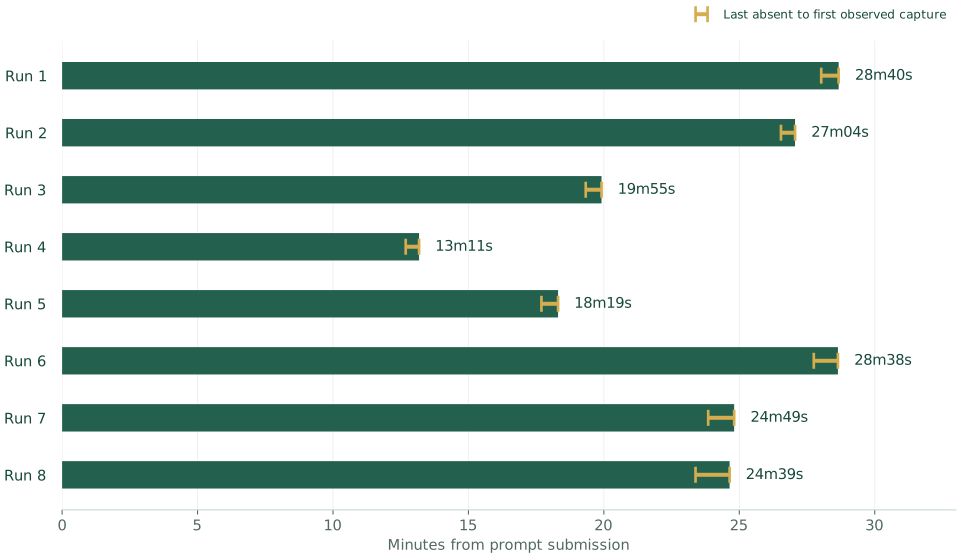
Build time: 13 to 29 minutes
The median time to first delivery was 24m44s. The chart includes incomplete deliveries and access blockers, so these are times to a delivered result rather than a fully verified application.
Dots already had a stack
Across these builds, Dots behaved as though the stack had already been decided. We left the technology choices open. It used Cloudflare Workers, D1 and ChatGPT sign-in every time, with no visible comparison of providers. Our reading is that Dots was following the platform’s plan for building an app. Calling this a choice of tools gives the impression of a selection process we did not observe.
That is convenient for the user. OpenAI takes care of the setup, and the app has somewhere to run, somewhere to store data and a way for people to sign in. It also puts OpenAI in control of those decisions. The plugin directory offers alternatives, but using them requires a reason to depart from a stack that is already available and connected.
Cursor Origin offers a similar arrangement for source control, putting repository hosting and pull requests alongside the agent as an alternative to GitHub. Each of these services makes the agent more convenient while giving its provider another part of the developer’s business.
For OpenAI, keeping the app on its platform means the customer relationship can continue long after the code is written. That creates opportunities to sell more services and makes switching providers more work. For other developer-tool companies, getting listed in the plugin directory may not lead to much business.